
How Industrial Distributors Can Automate RFQ Processing with AI
Business Analysis Insights News


For industrial distributors, preparing a quotation often involves much more than looking up a product and entering a price.
A customer sends an email with a list of part numbers. Another attaches an Excel bill of materials. A third provides a PDF containing technical specifications, quantities and delivery requirements. Before a quotation can be prepared, someone has to understand the request, identify the correct products, check availability, confirm pricing and put everything into the company’s quotation format.
When the catalogue contains thousands of items and requests arrive in different formats, this work can take a significant amount of time.
AI-assisted RFQ processing offers a way to reduce that manual effort. It can extract information from incoming documents, organize product requirements, search internal catalogues and retrieve commercial data from ERP systems. The resulting quotation can then be prepared as a draft for a sales specialist to review and approve.
The important distinction is that automating RFQ processing does not mean handing commercial decisions over to an AI model. The most reliable solutions combine AI with structured product data, existing business systems, validation rules and human approval.
This guide explains how to approach RFQ processing automation, which tasks are suitable for AI, how to integrate the workflow with an ERP and how to evaluate whether a custom solution makes business sense.
Why RFQ processing becomes an operational bottleneck
A manual quotation process can work perfectly well when a company receives a manageable number of requests, has a relatively small product catalogue and deals with customers who provide information in consistent formats.
The difficulties usually appear as the business becomes more complex.
A distributor may work with multiple manufacturers, manage customer-specific product references and maintain different pricing agreements. Requests can contain a handful of items or hundreds of lines from a detailed bill of materials. Some products are easy to identify, while others require technical checks or confirmation from a supplier.
The quotation team has to handle all of this while responding to customers within commercially reasonable timeframes.
The problem is not just the volume of requests
Consider what happens when a quotation specialist receives an RFQ with 40 product lines.
They may need to:
- Review the original email and all attachments.
- Identify part numbers, quantities and technical requirements.
- Resolve customer-specific or manufacturer references.
- Find the corresponding items in the internal catalogue.
- Check whether the requested products are available.
- Retrieve prices, discounts and minimum order quantities.
- Confirm delivery estimates or contact suppliers.
- Transfer the information into a quotation template.
- Review the document before sending it to the customer.
The same sequence may need to be repeated for every request, even when much of the work involves retrieving information that already exists inside the company’s systems.
This is where RFQ processing automation can make a difference. Instead of asking specialists to manually move information between documents, catalogues and business applications, a connected workflow can prepare the information in a consistent format and leave people to handle decisions that require their knowledge.
Inconsistent input formats create additional work
Customers rarely follow one standard when requesting a quotation.
An RFQ may arrive as an email containing a short product list, an Excel file exported from another procurement system, a scanned PDF or a technical document with product descriptions embedded in tables.
Even when two customers request the same component, they may use different descriptions or reference numbers.
A useful automation solution therefore needs to handle more than text extraction. It must understand the structure of the request and preserve the relationships between products, quantities, specifications and customer references.
Product identification is a commercial risk
Finding a product with a similar description is not the same as confirming that it is the correct item.
Industrial catalogues often contain products with overlapping names and similar technical characteristics. A small difference in voltage, dimensions, material, tolerance or packaging can change whether a component is suitable.
If an automation system selects the wrong SKU, the resulting quotation may contain incorrect pricing, availability or technical information.
For this reason, a reliable RFQ workflow must distinguish between confirmed matches, possible alternatives and items that require further investigation.
Where manual work happens in the RFQ-to-quote process
Before selecting an AI solution, it is worth mapping the existing quotation process.
A typical RFQ-to-quote workflow includes six stages.
| Stage | Manual work | Potential automation |
| Request intake | Opening emails and collecting attachments | Email processing, file collection and RFQ registration |
| Document review | Reading PDFs, spreadsheets and technical files | Document classification and data extraction |
| Product identification | Searching for part numbers and equivalent references | Identifier normalization and catalogue matching |
| Commercial checks | Looking up prices, stock and delivery conditions | ERP data retrieval and rule validation |
| Quote preparation | Transferring information into templates | Automated quotation draft generation |
| Review and delivery | Checking exceptions and approving the quote | Approval routing, status tracking and audit records |
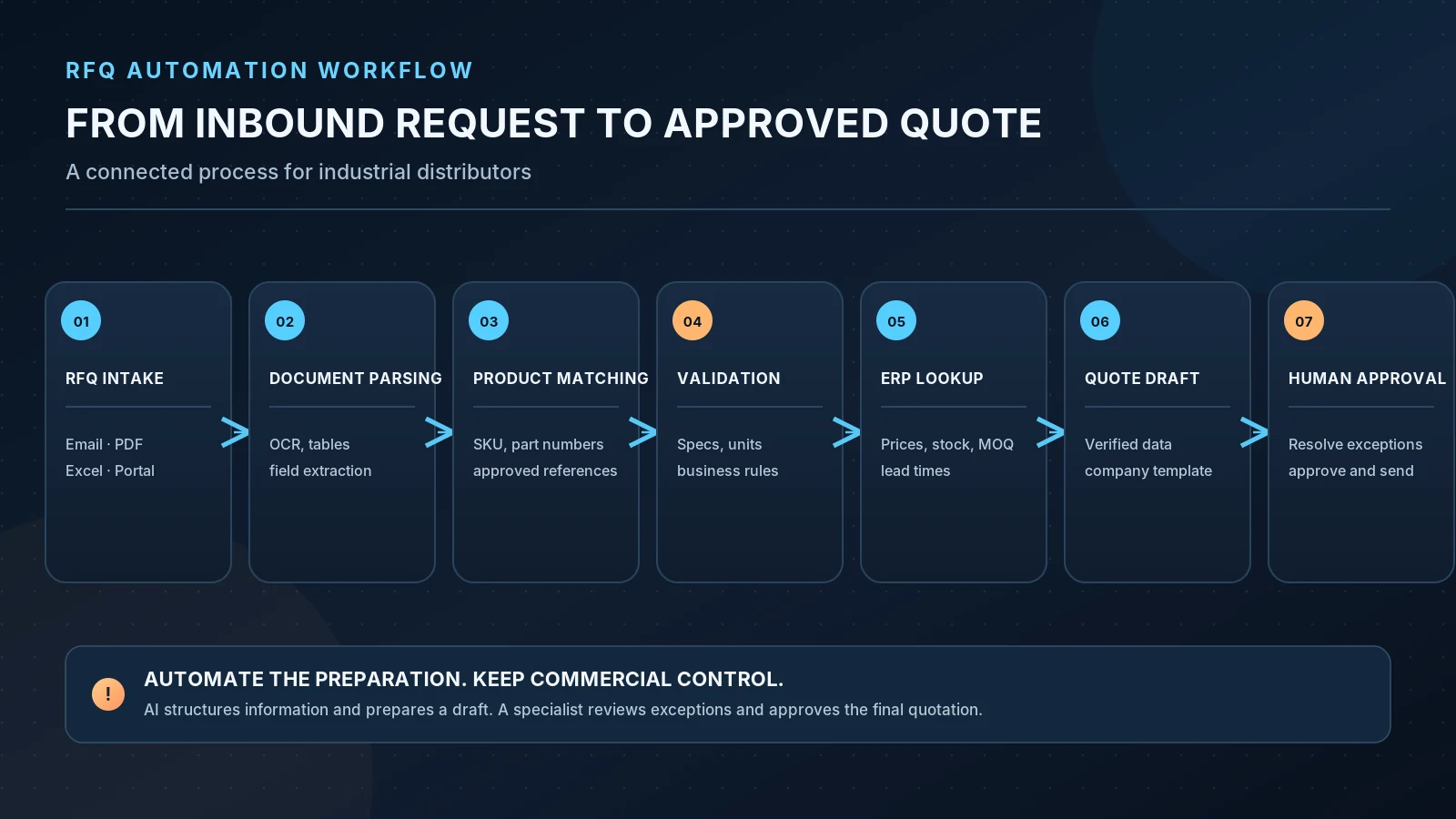
Not every stage should be automated in the same way.
Document interpretation may benefit from AI. Price retrieval should use trusted business data. Technical compatibility may require approved product rules or specialist confirmation. Final commercial approval should follow the company’s existing responsibilities.
This distinction helps avoid building a system that looks automated but simply moves the manual work somewhere else.
Which RFQ processing tasks can actually be automated?
AI is useful for interpreting unstructured information, but it should not be responsible for every decision in a quotation workflow.
A practical solution combines three types of functionality.
AI-assisted processing
AI can help interpret customer emails, recognize relevant document sections, extract product information and understand descriptions that differ from the terminology used in the internal catalogue.
It can also help identify the type of request, summarize unusual requirements and suggest possible catalogue matches.
Deterministic validation and business rules
Business rules should control tasks where a result needs to be predictable and repeatable.
Examples include:
- Checking whether an exact manufacturer part number exists.
- Validating an internal SKU against the product catalogue.
- Converting supported units of measure.
- Applying an approved customer pricing rule.
- Checking minimum order quantities and packaging multiples.
- Calculating quotation totals from verified prices and quantities.
- Preventing a quotation from advancing while required fields are missing.
These checks should not depend on a language model generating a plausible answer.
Human decisions and approvals
Some situations need a person rather than another automated step.
A quotation specialist may need to confirm a technically similar product, request clarification from the customer, obtain a supplier’s lead time or approve an exceptional discount.
The system should make these decisions easier by presenting the relevant information and explaining why a review is required.
The goal is not to automate every possible action. It is to automate routine preparation while making the remaining decisions faster and more transparent.
How AI processes RFQs from emails, PDFs and Excel files
The first technical step is to collect the incoming request and turn it into a structured RFQ record.
This process can begin with a shared email inbox, a website form, a customer portal or a document upload interface.
The system identifies the request, stores its original message and attachments, and assigns a unique reference so that each subsequent action can be traced back to the original submission.
Document intake and classification
The incoming files may include:
- PDF quotations and technical specifications.
- Excel and CSV product lists.
- Bills of materials.
- Scanned documents and images.
- Email messages containing product information.
- Supporting technical documentation.
The processing method depends on the format.
An Excel spreadsheet can usually be read directly as structured data. A digitally generated PDF may contain selectable text, while a scanned PDF requires optical character recognition (OCR). More complex documents may require layout and table recognition to preserve the relationships between fields.
The system should also identify unsupported or unreadable files rather than silently processing incomplete information.
Extracting product and order information
The extraction layer identifies the fields needed to prepare a quotation.
A typical RFQ line item may contain:
| Field | Example purpose |
| Manufacturer | Identifies the original manufacturer |
| Manufacturer part number | Supports product identification |
| Customer reference | Connects the request to the customer’s internal SKU |
| Product description | Provides additional context |
| Requested quantity | Defines the required order quantity |
| Unit of measure | Clarifies how the quantity is expressed |
| Technical specifications | Supports product validation |
| Requested delivery date | Defines the customer’s delivery requirement |
| Additional notes | Preserves special instructions |
The extracted information is normalized before it is passed to the matching process.
For example, the same manufacturer part number may appear with spaces or separators in one document and without them in another. Product descriptions may use abbreviations, alternative names or customer-specific terminology.
Normalization helps the system compare these values consistently.
It is equally important to retain the source of each extracted field. A specialist should be able to see which document and section supplied a particular value, especially when the original request is unclear.
How to match customer part numbers with an industrial product catalogue
Product matching is often the most demanding part of RFQ automation.
An industrial distributor may maintain thousands of SKUs, manufacturer references, customer-specific identifiers and approved alternative products. A customer may describe a product differently from the way it appears in the internal catalogue.
A reliable matching process should use several levels of validation instead of treating every search result as a confirmed product.
Start with exact identifiers
The first step is to compare manufacturer part numbers, internal SKUs and customer references against known catalogue records.
Where possible, the system should use normalized identifiers to account for formatting differences without changing the actual product identity.
Exact matches supported by the catalogue can move forward to commercial checks.
Use approved cross-references
Some manufacturers use different identifiers for the same product, and distributors may maintain approved mappings between manufacturer part numbers, internal SKUs and customer-specific references.
These mappings can be used to resolve a request without requiring a specialist to search manually every time.
However, the system should distinguish between a verified cross-reference and a suggested alternative.
A similar product description or a semantically related search result does not establish technical equivalence.
Compare technical attributes
When an exact identifier is unavailable, the system may search for candidates using relevant product attributes.
Depending on the product category, these could include:
- Dimensions and physical characteristics.
- Electrical ratings and voltage.
- Material and manufacturing properties.
- Connector types and configurations.
- Performance specifications.
- Supported standards and certifications.
AI-assisted search can help identify potentially relevant items, particularly when a customer uses different terminology.
The resulting candidates should still be checked against the technical requirements and the distributor’s approved catalogue rules.
Route uncertain matches for review
The system should classify each requested item according to its matching outcome.
| Match status | Meaning | Recommended action |
| Exact match | Verified identifier match | Continue processing |
| Approved cross-reference | Existing approved product mapping | Continue processing |
| Candidate match | Possible product identified | Specialist review |
| Multiple candidates | Several products may fit | Manual selection |
| No match | No suitable catalogue item found | Investigate or request clarification |
| Insufficient information | Required specifications are missing | Return for clarification |
Confidence thresholds should be calibrated against real catalogue data and reviewed outcomes. A model’s own confidence statement should not be treated as proof that a product is suitable.
This is particularly important when incorrect substitutions can create technical, financial or contractual risks.
Connecting RFQ automation with ERP systems
Identifying a product is only part of preparing a quotation.
The workflow also needs to retrieve current commercial information from the company’s business systems.
For most distributors, the ERP should remain the source of truth for the values it manages. The AI layer should request those values rather than attempt to generate them from historical documents or general model knowledge.
Depending on the ERP configuration, the integration may retrieve:
- Current product prices.
- Customer-specific price agreements.
- Volume discounts and pricing tiers.
- Available stock and warehouse information.
- Minimum order quantities.
- Packaging and order multiples.
- Expected lead times.
- Supplier availability, where recorded.
- Currency and other commercial conditions.
The system should validate the values before using them in a quotation.
For example, an item may exist in the catalogue but have no current price. Stock may be available in one warehouse but not another. A customer may have a negotiated price that differs from the standard catalogue price.
These situations need explicit business rules.
Why the ERP should remain the source of truth
An AI model should not independently invent a price, assume that stock is available or estimate a delivery date.
If the ERP cannot provide the required value, the system should mark the relevant line item for review or request additional information from the appropriate source.
This separation makes the workflow easier to maintain and gives quotation specialists a clear basis for commercial decisions.
What about CRM integration?
An ERP and a CRM serve different purposes in the process.
The ERP typically provides product and commercial information, while the CRM can connect RFQs and quotations with customer records, sales opportunities and account activity.
For companies using HubSpot, an approved quotation workflow may also update the relevant contact, company or deal record.
The specific integration should follow the way the sales team works. CRM synchronization is useful when it improves visibility across the sales process, but it should not be treated as a replacement for ERP pricing and inventory data.
For more on connecting CRM platforms with existing business applications, see DreamDev’s HubSpot integration services.
Generating quotations without losing commercial control
Once the requested items have been identified and the necessary ERP data has been retrieved, the system can prepare a quotation draft.
The draft should use the company’s existing quotation format and approved commercial rules.
A typical document includes:
- Customer details and RFQ reference.
- Product descriptions and manufacturer part numbers.
- Quoted quantities and units.
- Unit prices and approved discounts.
- Line totals and quotation total.
- Currency.
- Availability and estimated delivery times.
- Validity period.
- Payment and delivery terms.
- Notes about unavailable items or unresolved exceptions.
The system can also maintain a connection between each quotation line and the original RFQ information. This makes it easier to investigate a discrepancy without manually searching through several files.
Human approval should be built into the workflow
A generated quotation is not necessarily a quotation that is ready to send.
Before delivery, a specialist should be able to review the original request, extracted values, selected catalogue items, ERP data and final document.
The workflow should automatically flag situations such as:
- Unverified product matches.
- Missing technical specifications.
- Unavailable pricing.
- Unconfirmed supplier lead times.
- Discounts outside approved limits.
- Customer-specific conditions requiring authorization.
The reviewer should see what needs attention and why.
Only an approved quotation should move to the delivery stage. The system can then send the document through the designated channel, record the delivery status and update the associated customer or CRM record where required.
This approach keeps commercial responsibility with the people who understand the customer relationship and the company’s pricing policies.
What an AI-assisted RFQ-to-quote workflow looks like
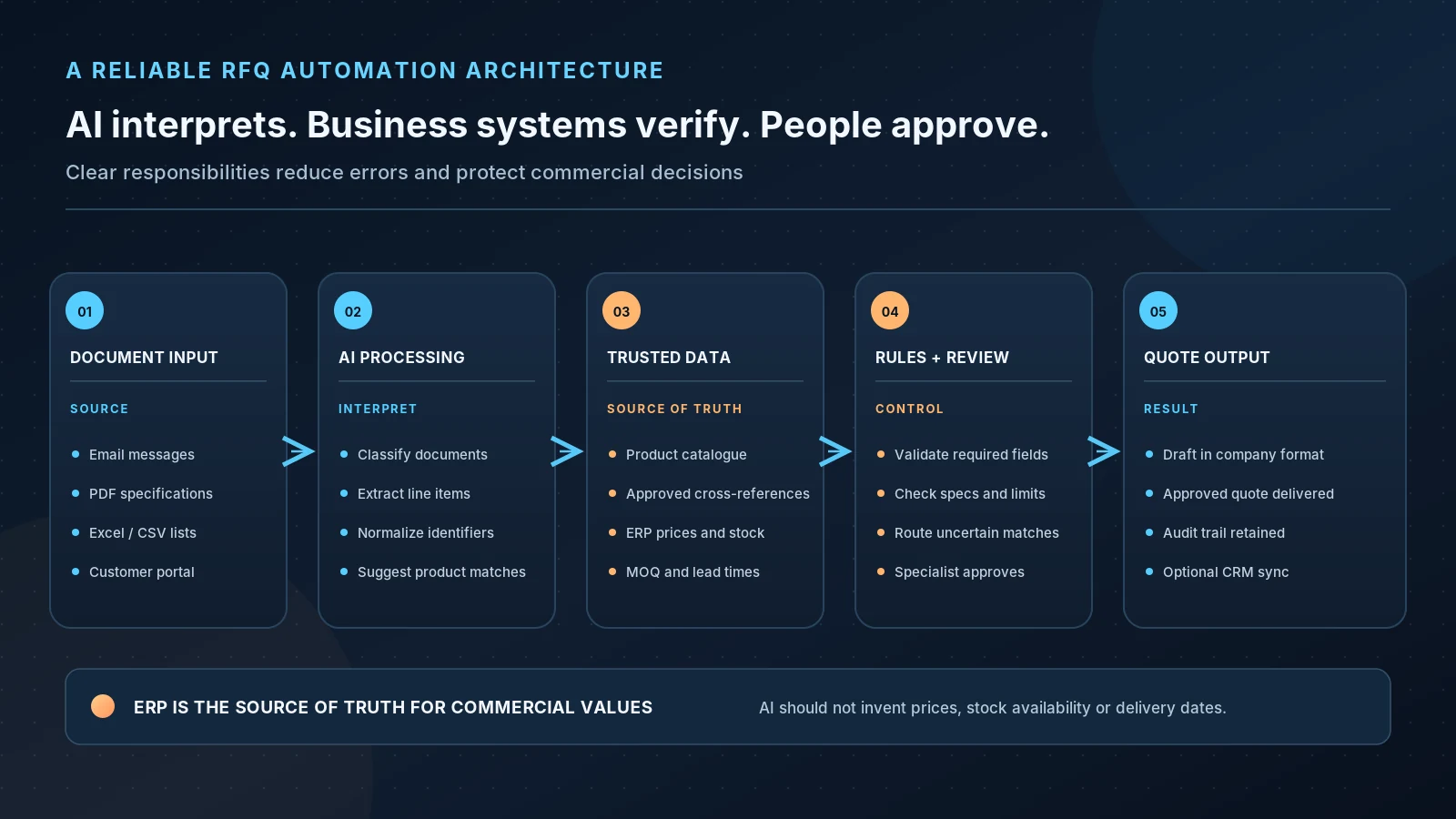
The architecture of a reliable solution usually connects several components rather than relying on a single AI model.
A typical workflow looks like this:
- RFQ intake
A request arrives through email or a supported portal. The original message and attachments are collected and assigned a unique RFQ reference.
- Document processing
The system classifies incoming files, extracts relevant data and normalizes product identifiers, quantities and specifications.
- Product matching
Requested items are checked against the internal catalogue using exact identifiers, approved cross-references and technical attributes.
- ERP integration
Current prices, availability, customer-specific conditions, MOQ and lead times are retrieved from the appropriate business systems.
- Quotation preparation
A draft is created using an approved template and validated commercial information.
- Human approval
A quotation specialist reviews exceptions, confirms unresolved matches and approves the document.
- Delivery and synchronization
The approved quotation is delivered to the customer and relevant records are updated in the connected systems.
The supporting architecture should also include document storage, workflow status management, validation, error handling and an audit trail.
For a more detailed look at how these components can be connected, see the AI-assisted RFQ processing reference implementation.
This companion page presents a proposed workflow and technical architecture. It should not be interpreted as a production client deployment or as evidence of measured customer results.
How to measure the ROI of RFQ processing automation
The value of automation should be measured against the actual work it removes or reduces.
A faster document extraction step does not necessarily mean that the entire quotation process is faster. If specialists still spend a long time checking product matches, requesting missing information or correcting inaccurate data, the overall benefit may be limited.
A useful evaluation therefore looks at the complete process.
Measure time across the entire workflow
Start by recording how much active staff time is required to process different types of RFQs.
Separate straightforward requests from complex ones. A simple request with a few exact part numbers should not be compared directly with a large BOM containing ambiguous product references and supplier checks.
Measure both active handling time and total turnaround time.
Active handling time shows how much employee effort is involved. Total turnaround time shows how long the customer waits between submitting the request and receiving an approved quotation.
These are different metrics, and both matter.
Track extraction and matching quality
Automation should also be evaluated for data quality.
| KPI | What it measures |
| Field extraction accuracy | How reliably required information is extracted from source documents |
| Exact match precision | How many automatically accepted exact matches are actually correct |
| Approved cross-reference accuracy | How reliably approved mappings identify the intended products |
| Manual exception rate | How often a specialist needs to investigate or correct a line item |
| Quotation correction rate | How often a generated draft requires rework |
| ERP retrieval success | How reliably the required commercial information is retrieved |
| Median processing time | Typical handling time across RFQs |
| 90th-percentile turnaround time | How long the slower and more complex requests take |
| RFQs processed per specialist | The team’s processing capacity |
| Quote-to-order conversion | The proportion of quotations that become orders |
It is important to measure product matching precision separately from matching coverage.
A system that automatically accepts only straightforward exact matches may have high precision but a lower automation rate. That can still be a good outcome when incorrect product selection would be expensive.
The objective should be to increase useful automation without lowering the reliability of the quotation process.
Calculate the value of released capacity
A basic way to estimate the operational benefit is to compare active handling time before and after automation.
Monthly capacity released:
(Baseline handling time per RFQ − Assisted handling time per RFQ) × Monthly RFQ volume ÷ 60
The calculation should include all manual work that remains after automation, including review and exception handling.
The estimated capacity value can then be calculated using the company’s fully loaded hourly labor cost.
However, released capacity is not automatically a reduction in payroll costs. The value may come from processing more requests with the existing team, improving response times or allowing experienced specialists to focus on higher-value commercial work.
The business case should also account for implementation, software, infrastructure, integration and ongoing maintenance costs.
Look beyond processing speed
Faster quotations can be useful, but they are not the only measure of success.
A well-designed workflow can also improve visibility into pending requests, reduce repeated data entry, make exceptions easier to identify and give managers a clearer picture of where quotation work is accumulating.
The effect on quote-to-order conversion should be measured separately. It can be influenced by pricing, product availability, customer relationships and market conditions, not just response time.
How to implement RFQ automation without disrupting the existing process
The safest approach is to begin with a focused workflow and validate it using real historical requests.
Attempting to automate every product category, document format and commercial rule at once makes it difficult to identify the source of errors.
A controlled implementation can be organized into five stages.
Map the current quotation process
Document how requests arrive, which people handle them and where the necessary information is stored.
Review the existing product catalogue, ERP interfaces, quotation templates, pricing policies and approval rules.
This step helps determine which tasks can be automated and which require changes to the underlying process or data.
Prepare a representative RFQ dataset
Collect a sample of historical requests covering different formats and levels of complexity.
For a focused pilot, approximately 100–200 RFQs can provide a useful starting dataset, depending on the variety and volume of requests.
The sample should include clean documents, scanned files, spreadsheets, multi-line BOMs, incomplete requests, customer-specific references and examples where no exact product match exists.
Experienced quotation specialists should review the sample and establish the correct expected outputs. This provides a reference against which extraction and matching results can be evaluated.
Build a focused prototype
Start with a limited scope:
- One product category.
- One ERP system.
- One primary input channel.
- One quotation template.
- A defined set of pricing and approval rules.
The first version should demonstrate the full flow, from receiving the request to producing a quotation draft.
It should also show how uncertain matches and missing information are handled.
Test in shadow mode
Before allowing the system to influence live quotations, run it alongside the existing process.
The automation prepares its output, while the quotation team continues using the established workflow. Specialists compare the results and record mismatches, missing fields, incorrect candidates and integration issues.
This makes it possible to find problems without introducing incorrect prices or products into customer-facing documents.
Roll out with controlled approval
Once the workflow performs reliably on the agreed dataset, introduce it to a limited group of users.
Keep human approval mandatory and monitor processing time, corrections, matching precision and exception rates.
Only expand to additional product categories or workflows when the current scope is stable.
When custom AI development makes more sense than standard tools
Not every distributor needs a custom RFQ automation platform.
Standard document-processing tools or existing ERP functionality may be sufficient when requests follow a consistent template, the product catalogue is simple and the quotation process relies on a small number of predictable rules.
Custom development becomes more relevant when the process involves several interacting systems or business-specific requirements.
Typical examples include:
- RFQs arriving in many document formats.
- Large product catalogues with inconsistent identifiers.
- Customer-specific SKU mappings.
- Manufacturer cross-reference logic.
- Technical specifications that require category-specific validation.
- Complex pricing and approval rules.
- Multiple ERP, CRM or supplier data sources.
- Custom quotation templates and delivery workflows.
- The need for detailed auditability and exception management.
In these situations, the most practical architecture may combine managed document processing, AI-assisted extraction, deterministic business rules, catalogue search and custom integrations.
The decision should be based on the existing workflow rather than on the desire to use AI for its own sake.
For example, if the main problem is missing catalogue mappings, a better search interface and data cleanup may be more valuable than adding another AI model. If the ERP already supports the full quotation process, an integration may be enough. If information is fragmented across documents and systems, a more tailored workflow may be justified.
An example of an AI-assisted RFQ processing architecture
The following reference workflow illustrates how the components can work together.
Incoming requests are received through an email inbox or an optional customer portal. The document-processing layer collects the original files and extracts the information required for quotation preparation.
The matching service checks the requested items against the product catalogue. Exact identifiers and approved cross-references can proceed through the workflow, while uncertain matches are sent for review.
The ERP integration retrieves commercial values from the appropriate business system. The quotation generator then assembles a draft using the approved data and company template.
A quotation specialist reviews the document, resolves any remaining exceptions and approves the final version. Only then does the workflow proceed to quote delivery and relevant CRM updates.
The architecture also keeps the original documents, processing statuses and approval history available for later reference.
This is the principle behind the RFQ processing reference implementation: AI assists with interpreting information, business systems provide trusted data, and human approval protects commercial decisions.
The scope of a real implementation would depend on the distributor’s ERP, catalogue structure, document formats and quotation policies.
Frequently asked questions about RFQ processing automation
What is RFQ processing automation?
RFQ processing automation is the use of software to handle repetitive tasks involved in processing requests for quotation. It can collect incoming requests, extract product details from documents, match products against an internal catalogue, retrieve commercial information and prepare quotation drafts.
Can AI process RFQs from email attachments?
Yes. An AI-assisted workflow can process email content and supported attachments such as PDFs, spreadsheets and scanned documents. The processing method depends on the file format. Structured Excel data can be parsed directly, while scanned documents may require OCR and layout recognition.
Can AI match manufacturer part numbers with internal SKUs?
It can help match manufacturer part numbers, internal SKUs and customer-specific references. Reliable implementations use exact identifiers and approved cross-references first, then use product attributes and AI-assisted search to identify possible candidates. Uncertain matches should be reviewed before they are used in a quotation.
Can RFQ automation integrate with an ERP?
Yes. A custom workflow can connect to an ERP through supported APIs or other documented integration methods to retrieve pricing, stock, MOQ, customer-specific conditions and lead times. The integration depends on the ERP platform and the availability of the required data.
Does RFQ automation eliminate the need for quotation specialists?
No. It is better understood as a way to reduce repetitive document handling, product lookup and data-entry work. Specialists remain responsible for technical decisions, commercial exceptions and quotation approval.
How do you measure the success of RFQ automation?
Useful metrics include active RFQ handling time, total quotation turnaround time, field extraction accuracy, product matching precision, manual exception rate, quotation correction rate, ERP retrieval success and RFQs processed per specialist. Quote-to-order conversion can also be monitored, although it depends on factors beyond automation.
How should a company start an RFQ automation project?
Start by mapping the existing workflow and reviewing a representative sample of historical RFQs. Identify the most time-consuming repetitive steps, check the quality of catalogue and ERP data, and select a limited scope for the first prototype. Test the workflow alongside the existing process before introducing it into live quotation preparation.
Build an RFQ workflow around your existing systems
Automating RFQ processing is not simply a matter of connecting an AI model to an email inbox.
The solution needs to understand the structure of incoming requests, identify products reliably, retrieve current commercial information and follow the rules that govern quotation preparation.
For some distributors, that may mean improving document extraction and catalogue search. For others, it may involve integrating an ERP, handling customer-specific product references and building an approval workflow around existing sales operations.
DreamDev Solutions develops custom software, AI-powered workflows and business-system integrations for companies with processes that do not fit neatly into off-the-shelf tools.
The starting point is understanding how your quotation team works today, where manual effort accumulates and which parts of the process can be automated without compromising product or pricing accuracy.
Discuss your RFQ processing workflow with DreamDev Solutions.
-
 Business Analysis Insights
HubSpot CRM Integration in 2026: Architecture, Real Examples and Best Practices
Connecting HubSpot to another system is usually not the hardest part. Building a reliable data flow between your website, CRM, ERP, ecommerce platform, internal databases and automation tools is a ...
17.11.2026 -
Business Analysis Insights
AI for WordPress: A Practical Guide to Smarter Websites, Automation, and AI Agents
Artificial intelligence is changing how businesses build, manage, and grow digital products. For WordPress websites, the shift goes far beyond AI-generated content or chatbots. Today’s AI solutio...
17.11.2026 -
Business Analysis Insights
WordPress HubSpot Integration Guide
Discover how to integrate WordPress with HubSpot to create a connected marketing and sales ecosystem. This comprehensive guide explains plugins, APIs, CRM synchronization, automation, enterprise ar...
17.11.2026