
AI-Powered WordPress Development Services That Drive Real Business Results
WordPress Development


WordPress is no longer just a content management system. It is becoming a smarter platform where AI is increasingly part of the editing, content, development, and decision-making process. WordPress.com’s AI Assistant now lives inside the editor and Media Library, where it can help adjust blocks, shape layouts, write content, and guide decisions. At the same time, search is moving further toward AI-assisted experiences, including AI Overviews and other generative search features, which changes how people discover and consume content online.
That shift matters for businesses. Search is becoming more answer-driven, and AI-generated summaries are already part of how users interact with results. In that environment, content that is thin, generic, or overly promotional is less likely to stand out. What performs better is content that is precise, structured, useful, and grounded in real business value.
AI-powered WordPress development is not about adding AI for the sake of looking modern. It is about using AI where it reduces friction, improves the experience, and supports business outcomes. For some teams, that means smarter search. For others, it means better content workflows, faster production, cleaner user journeys, more efficient support, or stronger development processes.
What AI-powered WordPress development actually means
AI-powered WordPress development means building or enhancing a WordPress site with features that use artificial intelligence in a practical way. That can include custom AI plugins, content assistants, semantic search, chatbot support, personalization, recommendation systems, and workflow automation.
The strongest implementations are not flashy. They are useful. They make the site easier to manage, easier to use, and easier to scale.
A better content workflow
A marketing team can use AI to draft outlines, generate first versions of metadata, summarize long pages, or create FAQ ideas. The human team still needs to shape the tone, check accuracy, and make sure the content supports the buying journey. That combination is where the real value appears.
AI can also help improve existing content. It can identify weak title tags, missing meta descriptions, thin content sections, internal linking gaps, and schema opportunities. For established websites, this is often more valuable than generating new pages from scratch because many SEO gains come from improving pages that already have authority.
Smarter search and navigation
A content-heavy website often fails when users search in natural language instead of exact keywords. AI-based search can understand intent better and surface more relevant results. That is especially valuable for blogs, resource hubs, knowledge bases, service websites, and eCommerce stores.
Instead of making users browse category by category, AI search can help them find what they need faster. That improves both user experience and conversion potential.
Faster support and self-service
A good AI assistant can answer repetitive questions, route users to the right page, and reduce pressure on support teams. For businesses that get the same questions over and over again, this can make the website feel more helpful without adding headcount.
For service businesses, that may mean faster answers about pricing, timelines, or technical requirements. For SaaS companies, it may mean better documentation discovery. For eCommerce brands, it may mean fewer support tickets around common product questions.
Why this matters now
The reason this topic is becoming more important in 2026 is not hype. It is behavior.
People are starting to expect websites to respond more intelligently. They want quicker answers, better search, and less friction. Search engines are also changing, with AI features affecting how results are presented and how users decide what to click. That means a website needs more than keywords. It needs depth, clarity, structure, and a real reason to be trusted.
For WordPress site owners, this creates a major opportunity. The platform is flexible enough to support advanced AI functionality, especially when combined with custom and complex WordPress development approaches that are built around real business needs. However, AI still requires the right architecture, performance strategy, and clear use case. Without that, it quickly becomes decoration instead of value.
That is why the best AI projects are not built around trends. They are built around problems: too much manual work, too many repetitive questions, poor search, weak content workflows, or a site that is hard to scale.
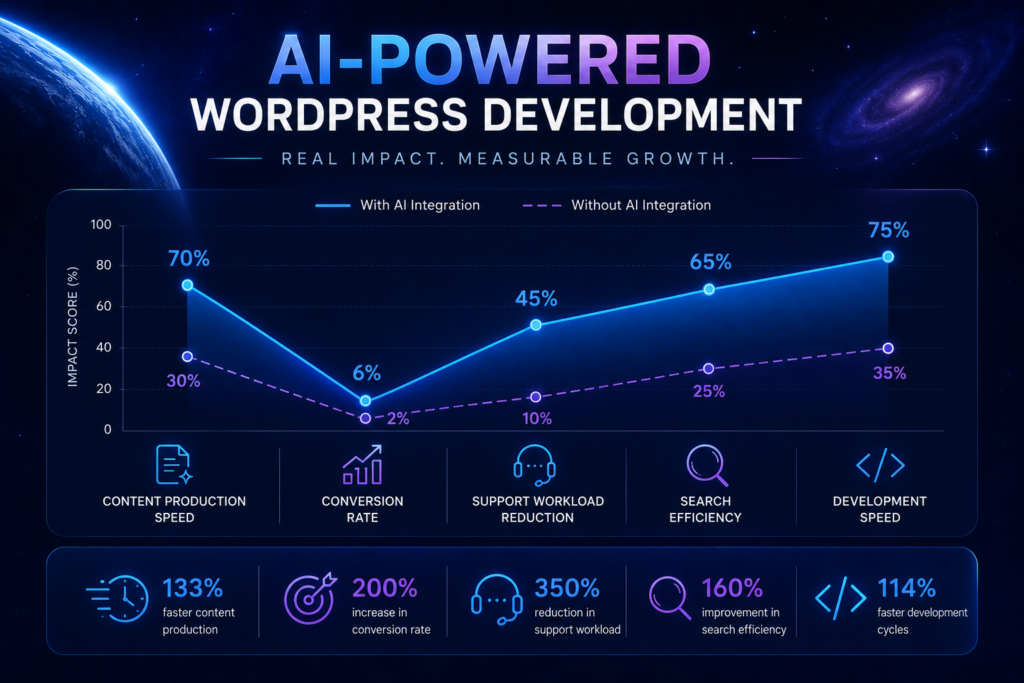
Real-world examples of where AI adds value
For a marketing website
Imagine a service page that gets traffic but does not convert well. AI can help speed up the content process, but the real improvement comes when the page is rewritten to answer commercial questions more clearly. That could include a stronger problem statement, practical use cases, an FAQ block, and a more direct CTA.
AI can also support the SEO side by helping identify missing internal links, underdeveloped sections, or content gaps around related search intent. Used well, this turns a single page into a stronger conversion asset.
For an eCommerce store
AI search can help a visitor type something like “lightweight shoes for travel” instead of forcing them to browse category by category. That saves time and makes the buying process smoother. AI can also help create product summaries and support content that is easier to scan.
For stores with large catalogs, AI can improve product discovery, reduce bounce rates, and help shoppers find relevant items faster. That is especially useful when the catalog is broad but navigation is weak.
For a content-heavy publication
A site with hundreds or thousands of pages can use AI to support editorial workflows, summarize older articles, and help readers find related content faster. This is especially useful when the content library is large but the internal navigation is weak.
AI can also help identify outdated posts, topic overlaps, and missing topic clusters, making it easier to maintain a healthier content ecosystem over time.
For a growing SaaS company
AI can support onboarding, help users find documentation, and reduce the number of repetitive support requests. It can also make product pages more dynamic by tailoring content to different audiences or stages of the funnel.
For SaaS teams, the biggest value often comes from reducing friction. The faster users understand the product, the easier it is to convert them and keep them engaged.
AI in content creation and SEO
One of the most common uses of AI in WordPress is content creation. AI tools can help generate blog drafts, service page outlines, product descriptions, FAQ ideas, and metadata. They can also suggest internal links, topic clusters, and related keywords.
This does not mean content should be published automatically. Search engines reward useful, original, and well-structured content. AI works best as a first draft engine or research assistant. A human editor should always refine the final text, check facts, and make sure the voice fits the brand.
AI can also support SEO and performance optimization in practical ways. It can help identify missing title tags, weak meta descriptions, thin content areas, and schema opportunities. That makes it easier to improve pages that already exist instead of always starting from zero. For agencies and businesses, this is useful because many SEO wins come from improving the site structure and content quality of pages that already have some authority.
Another strong use case is image support. AI can generate supporting visuals, suggest alt text, and help create social media graphics for blog promotion. This can save design time, especially for content-heavy teams. Still, images should always be checked for relevance, visual quality, and brand consistency.
A strong AI content workflow usually follows a simple process:
- Use AI to generate drafts.
- Edit for expertise and clarity.
- Add real examples or insights.
- Optimize structure with H2s, H3s, and lists.
That approach improves the chances of ranking for long-tail keywords while keeping the content useful for real readers.
AI chatbots and personalization
AI is also changing how websites communicate with visitors. Chatbots can answer simple questions, guide users to the right page, collect leads, and provide basic support outside business hours. For service websites, this can reduce friction and improve conversion rates.
This is especially useful when visitors need quick answers about pricing, timelines, services, or technical requirements. Instead of waiting for a reply, they can get immediate guidance. That improves the experience and helps sales teams focus on more valuable conversations.
Combined with CRM tools and automation workflows such as HubSpot integration, AI can also help businesses improve lead capture, customer communication, and follow-up processes.
Personalization is another strong area. AI can help show relevant content based on user behavior, location, or previous visits. For example, a returning visitor might see related case studies, while a first-time visitor might see a clearer introduction to services. This makes the site feel more helpful and more relevant.
The key is to keep personalization useful, not intrusive. AI features should support the visitor’s journey, not distract from it.
AI inside modern development workflows
AI is becoming more valuable inside the development process too. It can help developers generate code snippets, create reusable sections, troubleshoot issues, and speed up routine tasks. For teams working on many WordPress projects, this can create meaningful efficiency gains.
AI-assisted development is especially useful for repetitive work such as building layout sections, creating starter templates, writing simple functions, or generating documentation. It can also help with debugging and code review by pointing out possible issues faster.
But the same rule applies here as with content. AI output must be reviewed by a human developer. Code should be checked for security, compatibility, maintainability, and performance. A fast draft is useful only when it leads to a safe and reliable final result.
For agencies, the best workflow is usually a hybrid one. Let AI handle the first pass, then let the team verify, improve, and ship the final version with confidence.
Performance and security considerations
AI features can improve websites, but they can also introduce problems if they are not implemented carefully. Some AI plugins add extra scripts, external requests, or heavy processing that may slow the site. Others may send user data to third-party services without clear consent.
That is why performance and security must be part of the AI conversation from the start. Every new plugin or integration should be tested for speed impact, compatibility, and privacy practices. If a feature adds too much weight, it can hurt the user experience and reduce search performance.
A good rule is to prefer lightweight and well-maintained solutions. Use caching where appropriate, limit unnecessary scripts, and keep the number of plugins under control. The goal is not to add AI everywhere. The goal is to use it where it creates measurable value.
Security also matters. AI tools should be reviewed with the same care as any other WordPress plugin. Keep them updated, check permissions, and make sure they follow privacy requirements. This is especially important for sites that handle customer data, lead forms, or eCommerce transactions.
How DreamDev Solutions can position this service
DreamDev Solutions can frame AI-powered WordPress development as a business-first service, not a trend package.
The service can start with business analysis because the best AI features are usually tied to a specific problem. For example, the goal may be to reduce support requests, improve content production, create smarter internal search, or speed up publishing. Once the goal is clear, the technical solution can be designed around it.
That can include custom plugin development, AI search, chatbot integration, AI-assisted content workflows, headless WordPress setups, and performance-focused implementation. For more complex projects, AI should be introduced in a controlled way, with security, usability, and maintainability built into the process from the beginning.
This is where DreamDev’s stronger WordPress foundation matters. A lot of AI projects fail because the implementation is rushed. A good build should feel clean, stable, and intentional.
Why this service is commercially relevant
This topic is commercially strong because it sits at the intersection of three things businesses care about: efficiency, visibility, and conversion.
Efficiency matters because teams want to ship faster with less manual work. Visibility matters because search is moving toward AI-assisted discovery, which rewards pages that are useful, specific, and well structured. Conversion matters because better search, clearer answers, and smoother user journeys help visitors take action.
That is why this is not just a technical topic. It is a growth topic.
For agencies and business owners, AI in WordPress is most valuable when it supports measurable outcomes:
- Faster content production
- Better search discovery
- Lower support volume
- Stronger engagement
- Improved conversion rates
- More efficient development cycles
What a strong AI WordPress project should include
A good project should start with a real use case, not with a tool.
1. Business analysis
What is the actual problem? Is it content speed, support load, search quality, or user engagement?
2. Technical planning
Which parts should use AI, and which should stay fully manual?
3. Custom implementation
Build only the feature set that supports the goal. Keep it lean.
4. UX review
Make sure the AI feature improves the experience instead of distracting from it.
5. Performance and security checks
AI should not slow down the site or create unnecessary risk.
6. Measurement
Track the impact on page speed, search visibility, conversions, publishing speed, and support load. Without measurement, it is impossible to know whether the AI feature is actually helping.
Best practices for using AI in WordPress
The strongest AI strategy is simple. Start with one clear goal, then choose tools that solve that problem well.
If the goal is content, use AI to speed up drafting and SEO support. If the goal is support, use AI for chat and ticket deflection. If the goal is development, use AI for code assistance and workflow acceleration. In every case, keep human review in place.
It is also smart to measure results. Look at page speed, search visibility, conversions, and support load before and after AI is added. That makes it easier to understand whether the feature is actually helping.
Another important point is consistency. AI should fit the brand voice, site architecture, and design system. A useful AI implementation feels invisible to the user because it simply makes the experience better.
Final thoughts
AI-powered WordPress development is becoming one of the most practical ways to make a website more useful, more efficient, and more scalable. The best projects are not the ones that look the most futuristic. They are the ones that solve real business problems and make the site easier to run.
For companies that want better content workflows, smarter search, stronger support, and more flexibility, this is a direction worth taking seriously.
The most effective AI in WordPress is not decorative. It is strategic, measurable, and built around actual business needs.
FAQ
What is AI-powered WordPress development?
It is the process of using artificial intelligence to improve how a WordPress site works, whether through content support, search, support automation, personalization, or custom features.
Is AI useful for WordPress SEO?
Yes. AI can help with outlines, metadata, FAQ ideas, internal linking support, schema opportunities, and content audits. The real value comes when it improves content quality and user intent matching, not when it simply adds more keywords.
Can AI replace a WordPress developer?
No. AI can speed up routine work, but it cannot replace strategy, architecture, UX decisions, or quality control.
Which businesses benefit most from AI in WordPress?
Businesses with content-heavy sites, eCommerce stores, SaaS products, and service businesses with repetitive support questions usually benefit the most.
Is AI safe to use on a WordPress website?
Yes, when it is implemented carefully. Security, privacy, and performance need to be considered from the start.
Does AI improve conversions?
It can. Better search, smarter support, clearer content, and more relevant recommendations all make it easier for visitors to take action.
-
 WordPress Development
 What Happens After a WordPress Website Goes Live? The Work Nobody Plans For
From CRM integrations and plugin updates to technical debt and new business requirements, discover the work that keeps a growing WordPress website moving after launch.
27.05.2026 -
WordPress Development
Taking Over an Existing WordPress Website: A Technical Guide for Agencies
Taking over an existing WordPress website? This technical guide helps agencies assess infrastructure, code, security, integrations, SEO, performance, and technical risks before accepting responsibi...
27.05.2026 -
WordPress Development
How to Handle WordPress Development Overflow Without Hiring
Learn how to handle WordPress development overflow, add flexible capacity, and take on more projects without rushing into a full-time hire.
27.05.2026