Static Site Generation (SSG)
Pages are generated during deployment instead of when users request them.
- No PHP execution
- No database queries
- No theme rendering
- No plugin processing
- Pre-rendered HTML delivered instantly

Headless WordPress vs Traditional WordPress: Which Architecture Is Right for Your Business?

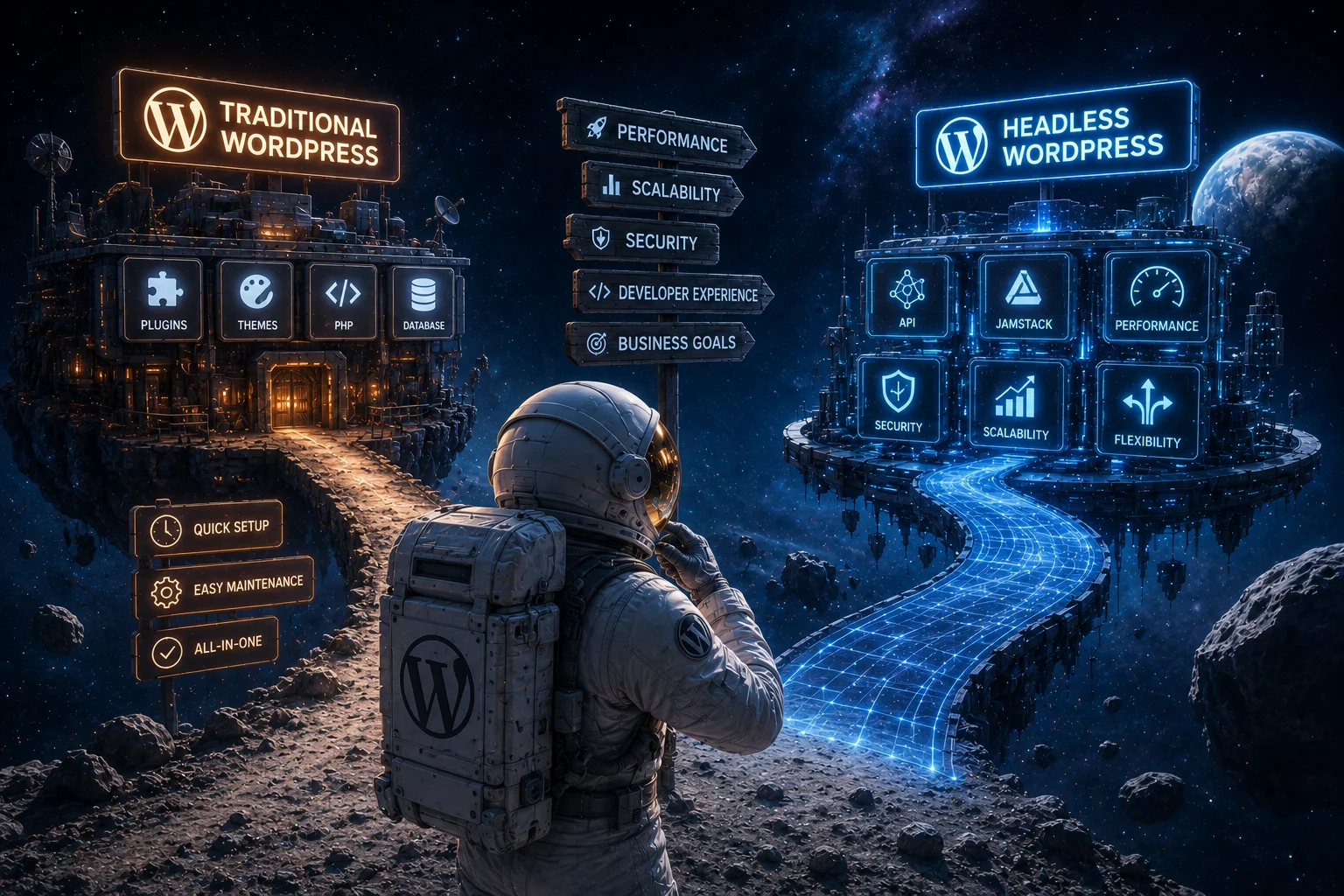
The debate between Headless WordPress and Traditional WordPress has intensified as businesses demand faster websites, better user experiences, and greater flexibility across multiple digital channels.
Both architectures rely on the same trusted WordPress CMS, but they differ fundamentally in how content is delivered to users.
Combines content management, content delivery, and frontend rendering within a single application.
Separates content management from presentation. WordPress becomes the content repository while frameworks like Next.js or React power the frontend experience.
Important
Neither architecture is inherently better than the other. The right choice depends on your business objectives, technical requirements, available resources, and long-term digital strategy.
A high-level comparison of Traditional WordPress and Headless WordPress across the factors that most organizations evaluate during platform selection.
| Feature | Traditional WordPress | Headless WordPress |
|---|---|---|
| Setup Speed | ⭐⭐⭐⭐⭐ | ⭐⭐⭐ |
| Developer Flexibility | ⭐⭐⭐ | ⭐⭐⭐⭐⭐ |
| Core Web Vitals | ⭐⭐⭐⭐ | ⭐⭐⭐⭐⭐ |
| Plugin Ecosystem | ⭐⭐⭐⭐⭐ | ⭐⭐ |
| Editorial Experience | ⭐⭐⭐⭐⭐ | ⭐⭐⭐ |
| Multi-channel Delivery | ⭐⭐ | ⭐⭐⭐⭐⭐ |
| Enterprise Scalability | ⭐⭐⭐⭐ | ⭐⭐⭐⭐⭐ |
| Initial Cost | Lower | Higher |
| Maintenance Complexity | Lower | Higher |
| Best For | Marketing websites, blogs, business websites | Enterprise platforms, SaaS products, high-performance websites |
Choosing between Traditional and Headless WordPress isn’t about following trends. It’s about selecting the architecture that fits your business.
At DreamDev, we’ve built, optimized, and supported both approaches. Some clients benefit from the simplicity and flexibility of traditional WordPress, while others need the scalability and development freedom that a Headless architecture provides.
Instead of treating Headless WordPress as a universal upgrade, we focus on matching the technology to real business needs. In our experience, the right architecture depends on factors such as your team’s workflow, expected traffic, integration requirements, long-term maintenance, and growth plans.
That’s why this comparison is based not only on technical differences, but also on practical experience helping businesses make the right decision.
Traditional WordPress, often referred to as monolithic WordPress, is the architecture that has powered millions of websites for more than two decades. It combines content management, frontend rendering, plugins, themes, and database operations into one tightly integrated application.
In Simple Terms
One application handles everything—from managing content to generating the final HTML delivered to visitors.
Content Management
Create and organize website content.
Database
Stores posts, pages, users, settings, and media.
Theme Rendering
Builds every webpage using PHP templates.
Plugins
Add additional functionality without custom development.
User Authentication
Handles login, permissions, and user management.
Frontend Presentation
Delivers the finished website to visitors.
What Happens Behind the Scenes?
Every time a visitor opens a page, WordPress retrieves content from the database, executes PHP, loads active plugins, applies the selected theme, generates HTML, and sends the completed page to the browser.
Traditional WordPress remains popular because it minimizes complexity. Businesses can launch professional websites quickly, while editors can publish and manage content without relying on developers.
Fast Time to Market
Marketing teams can launch websites within days instead of months.
No-Code Content Editing
Editors can create pages and publish content without developer assistance.
Massive Plugin Ecosystem
Thousands of plugins extend functionality without building custom software.
Popular Capabilities
Business Impact
For many organizations, these capabilities significantly reduce development costs while accelerating project delivery.
As websites become larger and more feature-rich, complexity naturally increases. Enterprise projects often accumulate numerous plugins, integrations, scripts, and database queries that must all be processed before a page is delivered.
Growing Complexity
Potential Challenges
Important
Traditional WordPress is not inherently slow. Well-optimized enterprise websites can achieve excellent performance. However, maintaining that performance often requires advanced caching, CDN configuration, database optimization, infrastructure tuning, and continuous monitoring.
Headless WordPress separates content management from presentation. Instead of generating webpages itself, WordPress acts as a content repository while a modern frontend framework delivers the user experience.
Core Idea
WordPress manages content. Frameworks like Next.js or React render the website.
Next.js
React
Nuxt
Gatsby
Astro
Remix
SvelteKit
Decoupled Architecture
This model is known as decoupled architecture. The frontend (“head”) is separated from the CMS (“body”), giving developers complete freedom over how content is presented across websites, mobile apps, kiosks, and other digital channels.
In a headless architecture, WordPress no longer renders webpages. Instead, it manages content and exposes it through APIs, while a modern frontend framework is responsible for rendering, optimization, caching, and delivery.
How It Works
WordPress focuses exclusively on content management, while the frontend independently handles page rendering, caching, optimization, and content delivery.
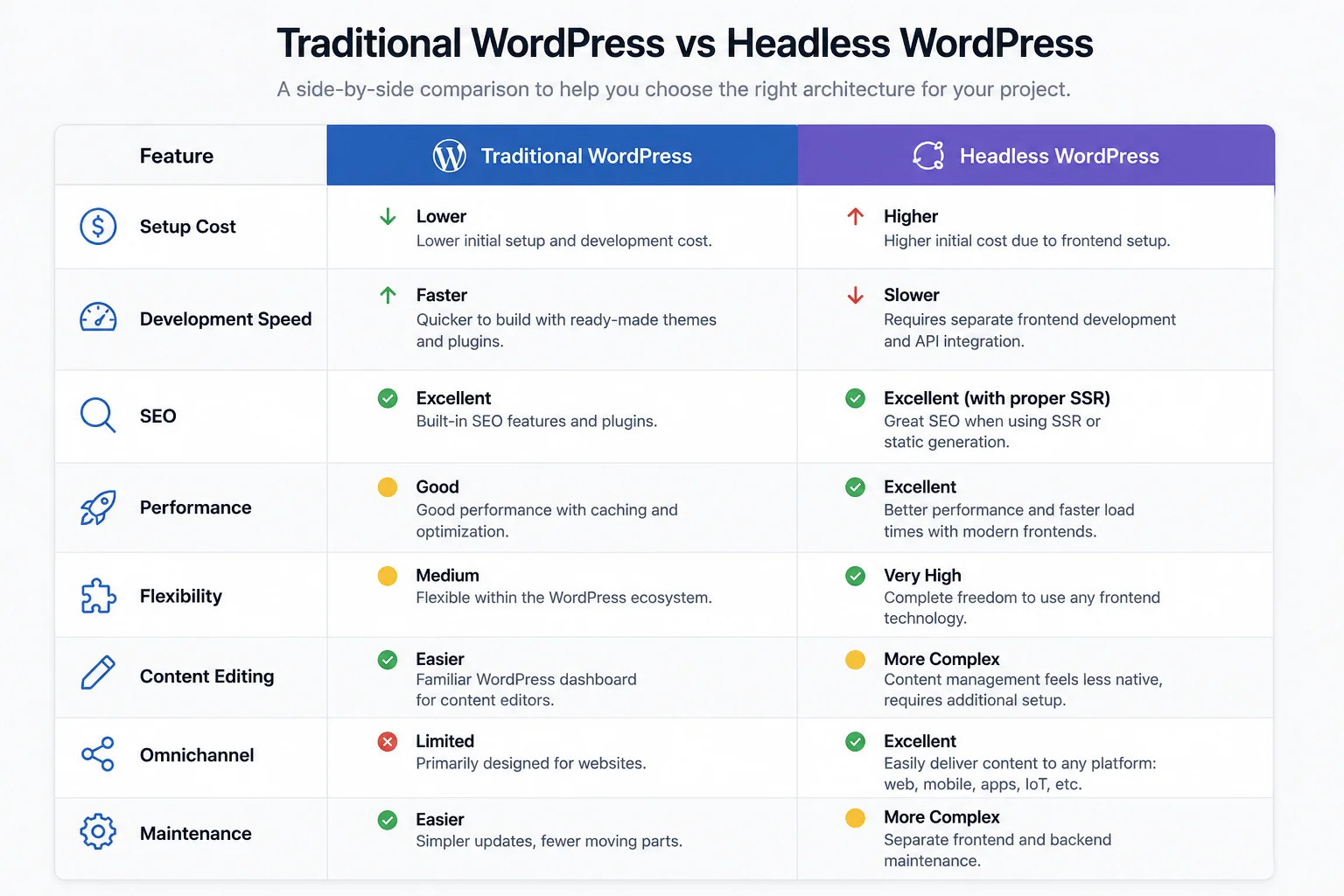
Traditional WordPress vs Headless WordPress Comparison
Traditional WordPress
Imagine owning a restaurant where every meal is prepared only after a customer places an order.
Each page request triggers PHP execution, database queries, plugin loading, and HTML generation before the visitor receives the final webpage.
Headless WordPress
Think of a premium meal delivery service where most meals are prepared ahead of time, stored efficiently, and delivered almost instantly when requested.
Much of the processing happens before the visitor arrives, allowing pages to be delivered with minimal server work.
Key Takeaway
Both approaches can produce outstanding websites. The real difference lies in when and where the processing happens. As websites grow larger and traffic increases, this architectural distinction becomes increasingly important.
Now that we’ve explored how both architectures work, it’s time to examine one of the primary reasons organizations consider adopting Headless WordPress: performance.
In the next section, we’ll compare real-world rendering strategies, analyze Core Web Vitals, and explain when Headless WordPress delivers measurable performance improvements—and when a well-optimized Traditional WordPress website can achieve similar results.
Performance is one of the primary reasons organizations consider moving from a traditional WordPress architecture to a headless setup. Today, website speed is no longer just a technical metric—it directly influences user experience, conversion rates, SEO performance, customer satisfaction, and ultimately revenue.
Why Performance Matters
According to Google, users expect webpages to load almost instantly. Even a one-second delay can reduce engagement, increase bounce rates, and negatively affect conversions. For enterprise organizations, every millisecond matters.
The Key Question
Does Headless WordPress automatically make your website faster?
Short Answer
No.
Complete Answer
Headless WordPress gives developers significantly more opportunities to build an exceptionally fast website—but only when the architecture is implemented correctly.
Important Perspective
Architecture creates opportunities, but implementation determines the outcome. Understanding why requires examining how Traditional and Headless WordPress generate and deliver webpages.
Traditional WordPress generates every webpage dynamically. Each visitor request triggers a sequence of backend operations before the final HTML can be delivered to the browser.
For a simple marketing website, this entire process happens remarkably fast. As enterprise websites evolve, however, the number of moving parts increases significantly.
Performance Doesn’t Decline Overnight
As complexity grows, maintaining excellent performance requires continuous optimization across the application stack.
Key Takeaway
Traditional WordPress can absolutely achieve excellent performance. The larger the website becomes, however, the more engineering effort is typically required to maintain that level of speed.
Headless WordPress changes how webpages are delivered. Rather than generating HTML for every request, modern frontend frameworks can build pages before visitors ever access them.
Static-First Delivery
Instead of asking WordPress to build each page, visitors receive an already optimized version distributed through a global Content Delivery Network (CDN).
Pages are generated during deployment instead of when users request them.
Dynamic pages are rendered by optimized Node.js servers, making SSR suitable for applications that require personalized or frequently changing content.
Instead of rebuilding the entire website after every content change, only the affected pages are regenerated.
Platforms such as Vercel, Netlify, and Cloudflare automatically distribute content across hundreds of edge locations worldwide.
Traditional WordPress generates every webpage dynamically. Each visitor request triggers a sequence of backend operations before the final HTML can be delivered to the browser.
For a simple marketing website, this entire process happens remarkably fast. As enterprise websites evolve, however, the number of moving parts increases significantly.
Performance Doesn’t Decline Overnight
As complexity grows, maintaining excellent performance requires continuous optimization across the application stack.
Key Takeaway
Traditional WordPress can absolutely achieve excellent performance. The larger the website becomes, however, the more engineering effort is typically required to maintain that level of speed.
Headless WordPress changes how webpages are delivered. Rather than generating HTML for every request, modern frontend frameworks can build pages before visitors ever access them.
Static-First Delivery
Instead of asking WordPress to build each page, visitors receive an already optimized version distributed through a global Content Delivery Network (CDN).
Pages are generated during deployment instead of when users request them.
Dynamic pages are rendered by optimized Node.js servers, making SSR suitable for applications that require personalized or frequently changing content.
Instead of rebuilding the entire website after every content change, only the affected pages are regenerated.
Platforms such as Vercel, Netlify, and Cloudflare automatically distribute content across hundreds of edge locations worldwide.
Performance influences much more than search rankings. Faster websites create better user experiences, improve engagement, and often have a measurable impact on business outcomes.
Business Perspective
For enterprise organizations, even modest improvements in website performance can translate into meaningful revenue growth. A faster website is often a more profitable website.
Some of the strongest evidence for Headless WordPress comes from enterprise implementations where performance improvements were measured at scale.
Headless WordPress
Next.js
GraphQL
Vercel
Cloudflare
Short Answer
No. Not every project benefits from moving to a Headless architecture.
| Category | Traditional WordPress | Headless WordPress |
|---|---|---|
| Initial Page Load | Good with optimization | Excellent when implemented correctly |
| Time to First Byte (TTFB) | Highly dependent on hosting and caching | Typically lower through CDN-first delivery |
| Largest Contentful Paint (LCP) | Good after optimization | Often excellent out of the box |
| Interaction to Next Paint (INP) | May degrade with heavy plugins | Easier to optimize with modern JavaScript architecture |
| Cumulative Layout Shift (CLS) | Depends on theme quality | Generally easier to control |
| Global Delivery | Requires CDN integration | Native edge deployment |
| High-Traffic Performance | Requires scaling infrastructure | Naturally suited for CDN distribution |
| Server Load | Higher during traffic spikes | Minimal for static content |
| Build Complexity | Lower | Higher |
| Long-Term Performance Potential | High with continuous optimization | Exceptional with the right implementation |
Headless WordPress is not inherently faster than Traditional WordPress.
What Headless offers is a fundamentally different architecture that makes exceptional performance easier to achieve and maintain at scale.
For smaller websites, a well-optimized Traditional WordPress installation can rival—or even outperform—a poorly implemented Headless solution.
For enterprise organizations with demanding performance requirements, global audiences, and complex digital ecosystems, Headless WordPress provides a stronger long-term foundation for consistently delivering excellent Core Web Vitals.
For years, one of the biggest concerns surrounding Headless WordPress has been search engine optimization. The good news is that Headless WordPress is neither inherently better nor worse for SEO. Success depends almost entirely on how the frontend is built and rendered.
Common Questions
The Short Answer
A properly implemented Headless WordPress website can rank just as well as—sometimes even better than—a Traditional WordPress website. Conversely, a poorly implemented Headless project can significantly reduce organic visibility.
Understanding why requires a closer look at how Google crawls, renders, and indexes modern websites.
One of the biggest misconceptions about modern SEO is that Google cannot understand JavaScript. That has not been true for years. Google can render JavaScript—the important question is when.
Google’s Indexing Process
Google’s indexing pipeline generally consists of two distinct stages. Understanding this process explains why rendering strategy is so important for SEO.
Googlebot first downloads the initial HTML response and immediately extracts the most important information from the page.
During a later stage, Google’s rendering service executes JavaScript and processes additional client-side content.
This is where many Headless implementations either succeed or fail from an SEO perspective.
The server returns an almost empty HTML document, while JavaScript loads the page content later in the browser.
Next.js generates fully rendered HTML before the response reaches Google or the visitor.
Key Insight
To users, both websites may appear identical. To Googlebot, however, the server-rendered version is considerably easier to crawl, index, and understand.
Pages are generated before users or search engines request them, meaning Google immediately receives fully rendered HTML.
Best For
Some webpages cannot be generated in advance because their content changes dynamically. SSR generates complete HTML on demand while still allowing search engines to crawl fully rendered pages.
Pure Client-Side Rendering (CSR) is generally not recommended for SEO-critical pages. While Google is capable of rendering JavaScript, relying entirely on client-side rendering introduces unnecessary complexity and potential indexing delays.
Why CSR Can Be Problematic
With pure CSR, the initial HTML contains very little meaningful content. The browser must execute JavaScript before users—and search engines—can access the page content.
The server typically returns only a minimal HTML shell, leaving most content to be rendered later by JavaScript.
Best Practice
Client-Side Rendering is generally best reserved for authenticated experiences such as user dashboards, account settings, or internal applications rather than public-facing marketing pages.
Traditional WordPress has earned its reputation as one of the world’s most SEO-friendly content management systems thanks to its mature ecosystem and extensive plugin support.
Popular SEO plugins such as Rank Math and Yoast SEO automate many optimization tasks without requiring developer involvement.
Marketing-Friendly Workflow
Most day-to-day SEO tasks can be managed directly by marketers without writing code or involving developers.
Headless WordPress does not lose any SEO capabilities. Instead, those capabilities move from plugins into the frontend application, where developers explicitly define every SEO element.
Important Difference
Instead of relying on an SEO plugin, developers are responsible for generating metadata directly within the application’s rendering layer.
<title>...</title>

<meta name="description">

<link rel="canonical">

<meta property="og:title">

<meta property="og:image">

<script type="application/ld+json">
Modern frameworks such as Next.js make this straightforward through built-in metadata APIs and server-rendered components. The key difference is that these features must be intentionally implemented rather than enabled through a plugin.
Enterprise Perspective
Enterprise development teams often treat SEO as part of the frontend architecture rather than as a plugin configuration task.
Structured data helps search engines better understand your content and enables enhanced search features such as rich results.
Structured data is commonly generated automatically through SEO plugins, requiring little or no manual implementation.
JSON-LD should be rendered directly within the server-generated HTML, giving developers complete control while remaining fully aligned with Google’s recommendations.
Key Takeaway
Whether you use Traditional or Headless WordPress, structured data remains a critical part of technical SEO. The difference lies in how it is generated—not in whether it should exist.
Internal links remain one of the strongest on-page SEO signals. Search engines discover new pages by following HTML links, making a well-structured internal linking strategy essential regardless of the website architecture.
Why Internal Links Matter
Googlebot primarily discovers new content by following links between pages. If important pages are difficult to reach—or links aren’t exposed through standard HTML—crawlability and indexation can suffer.
<a href="/enterprise-wordpress-development">
Standard HTML links are immediately discoverable by search engines and remain the recommended implementation.
onClick={() => navigate()}
Navigation that depends exclusively on JavaScript events may reduce crawlability if search engines cannot reliably discover linked pages.
Best Practice
Modern frameworks such as Next.js generate fully crawlable navigation when implemented correctly. Always ensure important pages are accessible through standard HTML links.
Every enterprise website should maintain an accurate XML sitemap that includes all indexable pages and is regularly submitted to Google Search Console.
Continue using WordPress to generate and maintain the XML sitemap while the frontend consumes the content separately.
Generate the sitemap directly within the frontend during the build or deployment process, ensuring it always reflects the latest published content.
Recommendation
Either approach is valid. The critical requirement is that every indexable URL appears in the sitemap and that the sitemap is submitted through Google Search Console.
Duplicate content becomes increasingly common as websites grow. Canonical tags tell search engines which version of a page should be indexed.
<link rel="canonical" href="https://example.com/page">
Migration Consideration
Canonical URLs become especially important during migrations. Without proper canonicalization, multiple versions of the same content may compete against one another in search results.
Images influence both Core Web Vitals and search visibility. Efficient image delivery improves loading speed, user experience, and SEO performance.
Image optimization is commonly handled through plugins that compress, resize, convert formats, and generate responsive image variants.
Frameworks such as Next.js include image optimization capabilities directly within the frontend application.
Business Benefit
Optimized images improve loading speed, reduce bandwidth usage, and contribute directly to stronger Core Web Vitals scores.
Both Traditional WordPress and Headless WordPress are capable of excellent SEO. The primary difference lies in how SEO features are implemented and managed.
| SEO Factor | Traditional WordPress | Headless WordPress |
|---|---|---|
| Metadata Management | Excellent with SEO plugins | Fully customizable but developer-dependent |
| XML Sitemap | Automatic | Manual or generated during build |
| Structured Data | Plugin-based | Generated by the frontend |
| Canonical Tags | Automatic | Developer implementation |
| Crawlability | Excellent | Excellent with SSR or SSG |
| JavaScript SEO | Minimal concern | Requires a proper rendering strategy |
| Technical Flexibility | Moderate | Extremely high |
Google is no longer the only place people search for information. Increasingly, users ask questions directly to AI assistants, changing how content is discovered and consumed.
A Fundamental Shift
Unlike traditional search engines that rank pages, AI-powered search systems identify authoritative sources, synthesize information, and generate comprehensive answers. Content quality, structure, and clarity have become more important than ever.
A new discipline has emerged: Generative Engine Optimization (GEO). Rather than optimizing exclusively for traditional search rankings, GEO focuses on becoming a trusted source that AI systems reference when generating answers.
Good for AI. Better for Readers.
Interestingly, the characteristics that help AI systems understand content also improve readability and user experience for human visitors.
Headless architecture does not directly improve GEO visibility. Instead, it provides a strong technical foundation that makes high-quality content easier for AI systems to access, interpret, and distribute.
Important Note
These technical advantages do not guarantee AI visibility. High-quality, authoritative content remains the primary factor in whether AI systems choose to reference your information.
Whether you use Traditional or Headless WordPress, content should increasingly be written for both human readers and AI-powered search systems.
Organize content into logical sections
This Guide as an Example
This article follows many of these principles. Each section answers a specific user question before expanding into more detailed technical explanations, making the content easier to understand for both people and AI systems.
Performance and SEO are important, but architecture also affects the people who build, maintain, and extend the platform. For many organizations, developer experience is one of the primary reasons to adopt Headless WordPress.
Beyond Performance
Choosing an architecture is not only about faster websites. It also determines how efficiently development teams can deliver new features, maintain code quality, and scale the platform over time.
Traditional WordPress development centers around a mature ecosystem that has evolved for more than two decades. For many projects, it remains one of the fastest ways to launch and maintain a professional website.
Key Takeaway
For many organizations, Traditional WordPress continues to offer one of the fastest and most cost-effective development workflows available.
Headless WordPress development aligns much more closely with modern software engineering practices. Instead of building primarily with PHP themes and plugins, teams work within contemporary JavaScript ecosystems.
The flexibility of Headless WordPress comes with additional engineering responsibility. Many capabilities that plugins handle automatically in Traditional WordPress must be intentionally designed and maintained.
Consider Your Team
For organizations with experienced engineering teams, this trade-off is often worthwhile. For smaller marketing-focused teams, the added complexity may outweigh the benefits.
There is no universal winner.
Traditional WordPress remains one of the strongest SEO platforms available thanks to its mature ecosystem, extensive plugin support, and ease of implementation.
Headless WordPress offers exceptional flexibility and can achieve outstanding SEO performance when built with modern rendering strategies, strong technical architecture, and disciplined implementation.
The most successful organizations don’t choose an architecture because it’s trendy — they choose the one that best supports their business objectives, editorial workflow, development capabilities, and long-term growth strategy.
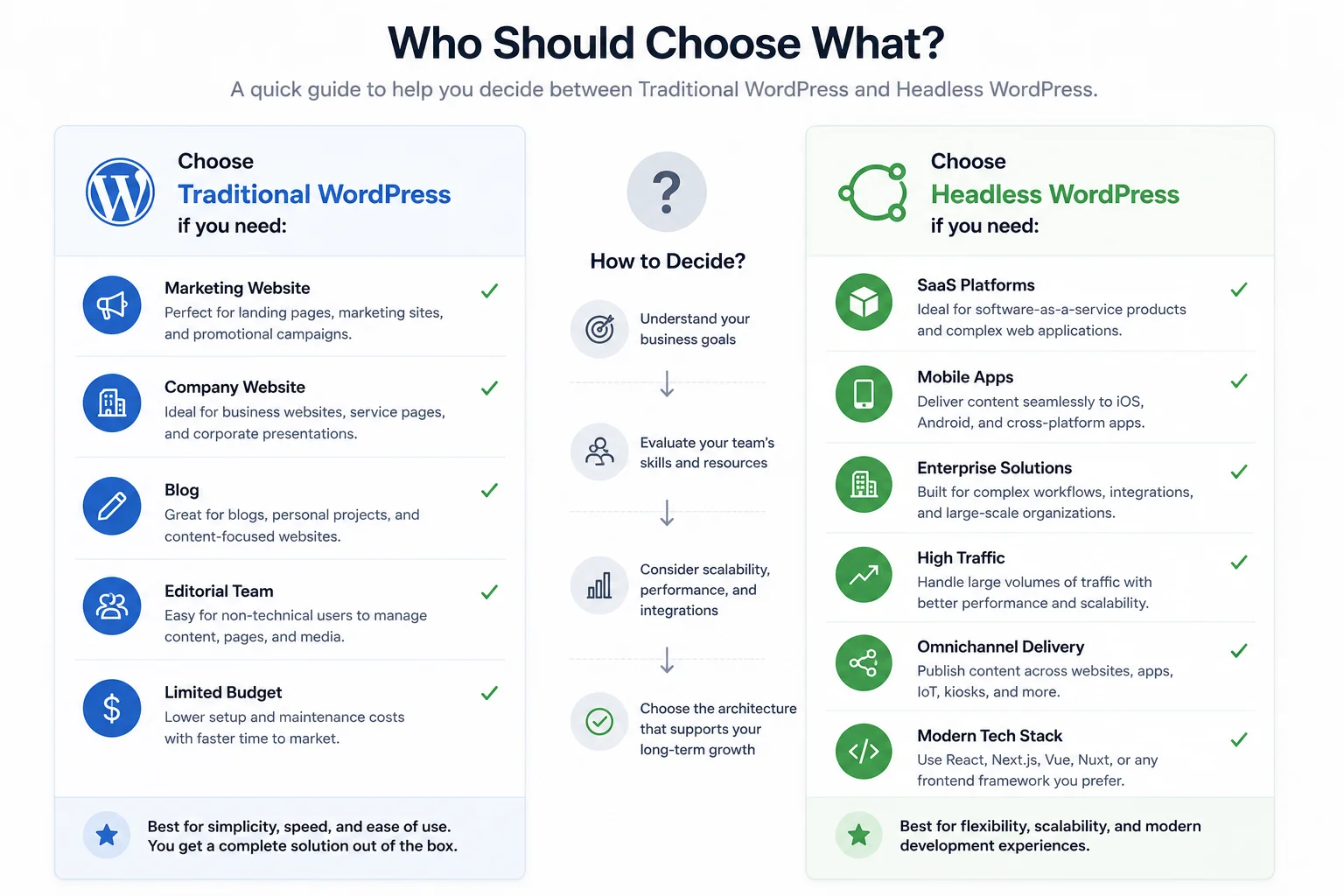
Not every project needs Headless WordPress. This guide compares the most common use cases to help you decide whether a traditional or headless architecture is the better fit for your business.
Security is often overlooked during architecture discussions, yet for enterprise organizations it is frequently one of the most important decision factors. Every public-facing website represents a potential attack surface that must be actively managed.
Architecture Matters
The architecture you choose directly affects your attack surface, operational complexity, and the long-term effort required to maintain a secure platform.
Security primarily focuses on protecting the monolithic application, including WordPress core, plugins, themes, user authentication, and server infrastructure.
Security responsibilities are distributed across multiple layers, including the CMS, APIs, frontend application, hosting platform, and deployment infrastructure.
Key Takeaway
Both Traditional and Headless WordPress can provide excellent security when implemented correctly. The difference is not whether they can be secure, but where security risks exist and how they are managed.
Traditional WordPress combines the content management system, frontend, and administrative dashboard into a single publicly accessible application. This unified architecture simplifies management but also creates a broader attack surface.
Visitors and administrators ultimately interact with the same WordPress application.
Why WordPress Is Frequently Targeted
WordPress powers a significant portion of the web, making it one of the most attractive platforms for automated attacks. This popularity does not mean WordPress is inherently insecure—it simply means it is one of the most frequently targeted platforms.
Key Takeaway
With proper governance, regular maintenance, and enterprise-grade security controls, Traditional WordPress can satisfy strict security requirements.
Headless architecture fundamentally changes the security model by separating the content management system from the public-facing website.
Architectural Difference
Visitors never communicate directly with WordPress. Instead, they interact with a separate frontend application while WordPress functions primarily as a private content management system.
Many organizations place the WordPress administration interface behind additional security layers, making it inaccessible from the public internet.
Attackers can no longer directly target many of the components that are publicly exposed in a traditional deployment.
Static Frontend Advantage
Public visitors are often served static assets directly from a CDN. Unlike a dynamic PHP application, static files cannot be compromised through many of the attack vectors commonly used against traditional web applications.
Reducing one attack surface inevitably creates another. In Headless architectures, APIs become the primary interface between systems and must be secured accordingly.
Security Principle
Expose only the APIs that are genuinely required. Reducing unnecessary public endpoints is one of the most effective ways to improve security.
Important Reminder
Poorly secured APIs can introduce entirely new vulnerabilities. Headless architecture reduces WordPress exposure, but API security becomes a core engineering responsibility.
Plugins represent one of the biggest security differences between Traditional and Headless WordPress.
| Security Area | Traditional WordPress | Headless WordPress |
|---|---|---|
| Public WordPress Exposure | High | Low |
| Plugin Attack Surface | Larger | Smaller |
| Static Frontend | No | Yes |
| API Security Requirements | Moderate | High |
| Infrastructure Complexity | Lower | Higher |
| Enterprise Isolation | Moderate | Excellent |
A successful migration to Headless WordPress requires careful planning. Rather than treating it as a simple redesign, enterprise organizations should approach it as a structured transformation with clearly defined milestones.
Recommended technologies:
Implementation priorities:
Deploy gradually and continuously monitor:
Enterprise Best Practice
Every enterprise migration should include a documented rollback plan. Even thoroughly tested deployments can reveal unexpected issues after launch, and having a recovery strategy minimizes business risk.
Many globally recognized organizations have adopted Headless architectures to improve performance, scalability, and user experience.
What These Organizations Have in Common
The greatest advantages of Headless WordPress typically emerge at scale. Organizations with global audiences, complex digital ecosystems, and demanding performance requirements often achieve measurable improvements in speed, resilience, and operational flexibility.
The right choice depends less on technology trends and more on your organization’s priorities, resources, and long-term goals.
| Your Priority | Recommended Architecture |
|---|---|
| Launch quickly | ✅ Traditional WordPress |
| Small business website | ✅ Traditional WordPress |
| Marketing-focused organization | ✅ Traditional WordPress |
| Heavy reliance on plugins | ✅ Traditional WordPress |
| Enterprise platform | ✅ Headless WordPress |
| SaaS application | ✅ Headless WordPress |
| Global content delivery | ✅ Headless WordPress |
| Omnichannel publishing | ✅ Headless WordPress |
| Highly interactive user experience | ✅ Headless WordPress |
| Marketing website + web application | ✅ Hybrid WordPress |
“The most successful enterprise organizations rarely ask, ‘Should we use Headless WordPress?’
Instead, they ask, ‘Which architecture best supports our business over the next five years?’“
For many companies, Traditional WordPress remains the fastest, most cost-effective, and easiest platform to manage. Its mature ecosystem enables marketing teams to launch and maintain websites with minimal engineering effort.
Organizations building global digital platforms, complex customer experiences, or omnichannel ecosystems often benefit from Headless WordPress, which provides greater flexibility, scalability, and long-term technical freedom.
In practice, many enterprise organizations adopt a hybrid approach, using Traditional WordPress for content-heavy marketing experiences while selectively introducing Headless solutions where performance, interactivity, or multi-channel content delivery create measurable business value.
Still deciding between Traditional WordPress and Headless WordPress? These are some of the most common questions organizations ask when evaluating both architectures.
Choosing between Traditional WordPress and Headless WordPress is not about selecting the newest technology. Instead, it is about selecting the architecture that best aligns with your business objectives, technical capabilities, editorial workflows, and long term growth plans.
Before making your decision, ask yourself:
If the answer to most of these questions is yes, a Headless WordPress architecture may provide significant long term value.
If not, Traditional WordPress continues to be one of the most powerful, scalable, and business friendly CMS platforms available.
The debate between Headless WordPress and Traditional WordPress often presents the two architectures as direct competitors.
In reality, they solve different business challenges.
Traditional WordPress excels at helping marketing teams launch, manage, and grow websites quickly while benefiting from one of the largest ecosystems of themes, plugins, and integrations available.
Headless WordPress is designed for organizations that require greater technical flexibility, enterprise scale performance, and the ability to deliver content across multiple digital experiences.
Neither architecture is inherently superior.
Success depends on choosing the solution that best supports your business goals, rather than simply following industry trends.
At DreamDev, we’ve learned that the most successful digital projects begin with strategy rather than technology.
Instead of asking, “Should we go headless?”, we encourage organizations to ask:
“What architecture will best support our business over the next five years?”
That question consistently leads to better decisions and, ultimately, better digital products.
 WordPress Development
 Learn how to handle WordPress development overflow, add flexible capacity, and take on more projects without rushing into a full-time hire.
Performance & SEO Search is changing. People are no longer relying only on short keyword queries to find information. They increasingly ask complex questions, compare solutions, and use AI-powered search experiences...
Business Analysis Insights Artificial intelligence is changing how businesses build, manage, and grow digital products. For WordPress websites, the shift goes far beyond AI-generated content or chatbots. Today’s AI solutio...