
Enterprise WordPress Development: The Complete Guide to Building a Scalable Business Website
Build a secure, scalable, and future ready WordPress platform designed for enterprise growth, complex integrations, large content operations, and long term SEO success.
WordPress Development

Enterprise WordPress development is about building a scalable digital platform that can support large content libraries, multiple teams, complex integrations, and significant traffic volumes without sacrificing performance, security, or flexibility.
Unlike traditional business websites, enterprise platforms function as lead generation engines, content hubs, customer engagement centers, and integration layers that connect marketing, sales, operations, and customer service systems.
When implemented correctly, WordPress provides an ideal balance of flexibility, cost efficiency, scalability, and SEO performance, making it a strong choice for organizations that need enterprise-grade capabilities without the licensing costs associated with proprietary CMS platforms.
Key Takeaway
Enterprise WordPress is not simply a larger website. It is a business platform designed to support growth, governance, integrations, compliance, and long-term digital operations.
What Is Enterprise WordPress Development?
Enterprise WordPress development refers to designing, building, and maintaining WordPress websites that meet enterprise-grade requirements.
These websites typically support:
- Thousands or even hundreds of thousands of pages
- Multiple content teams and editorial workflows
- CRM, ERP, DAM, PIM, and marketing automation integrations
- High traffic volumes and global audiences
- Strict governance and approval processes
- Security and compliance requirements
- Advanced SEO and content marketing initiatives
- Long-term scalability without costly replatforming
The objective is not simply launching a website but creating a digital ecosystem that supports marketing, sales, content operations, and business growth.
Enterprise vs Small Business Websites
| Factor | Small Business Site | Enterprise Website |
|---|---|---|
| Pages | 10–100 | 1,000–100,000+ |
| Editors (Users) | 1–5 | 10–500+ |
| Integrations | Email marketing only | CRM, ERP, DAM, PIM, Analytics |
| Governance | Informal | Formal approval workflows |
| Compliance | Limited requirements | GDPR, SOC2, HIPAA, PCI |
| SEO Scope | Local optimization | Large-scale content clusters |
| Traffic | Moderate | Millions of visitors |
WordPress has evolved far beyond its blogging roots. Today, global brands, publishers, universities, healthcare organizations, and SaaS companies use WordPress as the foundation of their digital presence.
The combination of open-source flexibility, extensive developer availability, modern editing capabilities, and strong SEO performance makes WordPress a compelling choice for enterprise organizations.
Why Enterprise Organizations Choose WordPress
Despite persistent misconceptions, WordPress is no longer viewed as a platform exclusively for blogs or small business websites.
Many enterprise organizations select WordPress because it provides flexibility and scalability without the licensing and vendor lock-in associated with proprietary CMS platforms.
1. Faster Content Operations
Marketing teams need to move quickly. Enterprise organizations frequently launch campaigns, publish new resources, update landing pages, and create content at scale.
The Gutenberg editor enables non-technical users to create and manage pages without requiring constant developer involvement.
Benefits:
- Faster publishing workflows
- Reduced developer dependency
- Greater marketing agility
- Consistent brand presentation
2. SEO-Friendly Foundation
SEO remains one of the strongest reasons enterprises adopt WordPress.
The platform provides:
- Clean URL structures
- XML sitemap generation
- Schema markup support
- Advanced metadata management
- Excellent internal linking flexibility
- Enterprise SEO plugin ecosystem
For organizations investing heavily in content marketing, WordPress offers a strong technical foundation for long-term organic growth.
3. Lower Total Cost of Ownership
Unlike many enterprise CMS platforms, WordPress has no licensing fees.
This allows organizations to invest budget into development, infrastructure, integrations, and content creation instead of annual platform subscriptions.
Enterprise Advantage:Organizations maintain ownership of their platform and avoid vendor lock-in while benefiting from a massive ecosystem of developers and service providers.
4. Access to a Massive Ecosystem
WordPress benefits from one of the largest software ecosystems in the world.
- 60,000+ plugins
- Thousands of integrations
- Global developer community
- Large agency ecosystem
- Open-source innovation
For enterprises, this means faster implementation cycles and easier access to specialized expertise.
5. Integration Flexibility
Enterprise websites rarely operate independently.
WordPress can integrate with:
- HubSpot
- Salesforce
- Marketo
- Microsoft Dynamics
- Google Analytics 4
- Adobe Analytics
- ERP systems
- PIM platforms
- Digital asset management systems
This flexibility allows WordPress to become the central content layer within a broader enterprise technology ecosystem.
WordPress vs Drupal vs Adobe Experience Manager
Choosing the right CMS depends on your business goals, technical requirements, governance needs, and available budget.
| Feature | WordPress | Drupal | Adobe Experience Manager |
|---|---|---|---|
| License Cost | Low | Medium | Very High |
| Content Editing UX | Excellent | Moderate | Strong |
| Development Speed | Fast | Moderate | Slow |
| Plugin Ecosystem | Largest | Large | Limited |
| Developer Availability | Excellent | Moderate | Limited |
| Headless Support | Strong | Strong | Strong |
| SEO Flexibility | Excellent | Strong | Strong |
| Workflow Management | Plugin-Based | Built-In | Advanced Built-In |
| Multilingual Support | Strong | Strong | Strong |
| Total Cost of Ownership | Lowest | Medium | Highest |
When WordPress Is the Best Choice
- Content marketing is a major growth channel
- SEO is a business priority
- Marketing teams require autonomy
- Budget efficiency matters
- Multiple integrations are required
- Long-term flexibility is important
Need Enterprise WordPress Expertise?
DreamDev helps growing companies build scalable WordPress platforms that combine performance, security, SEO, and enterprise-grade integrations.
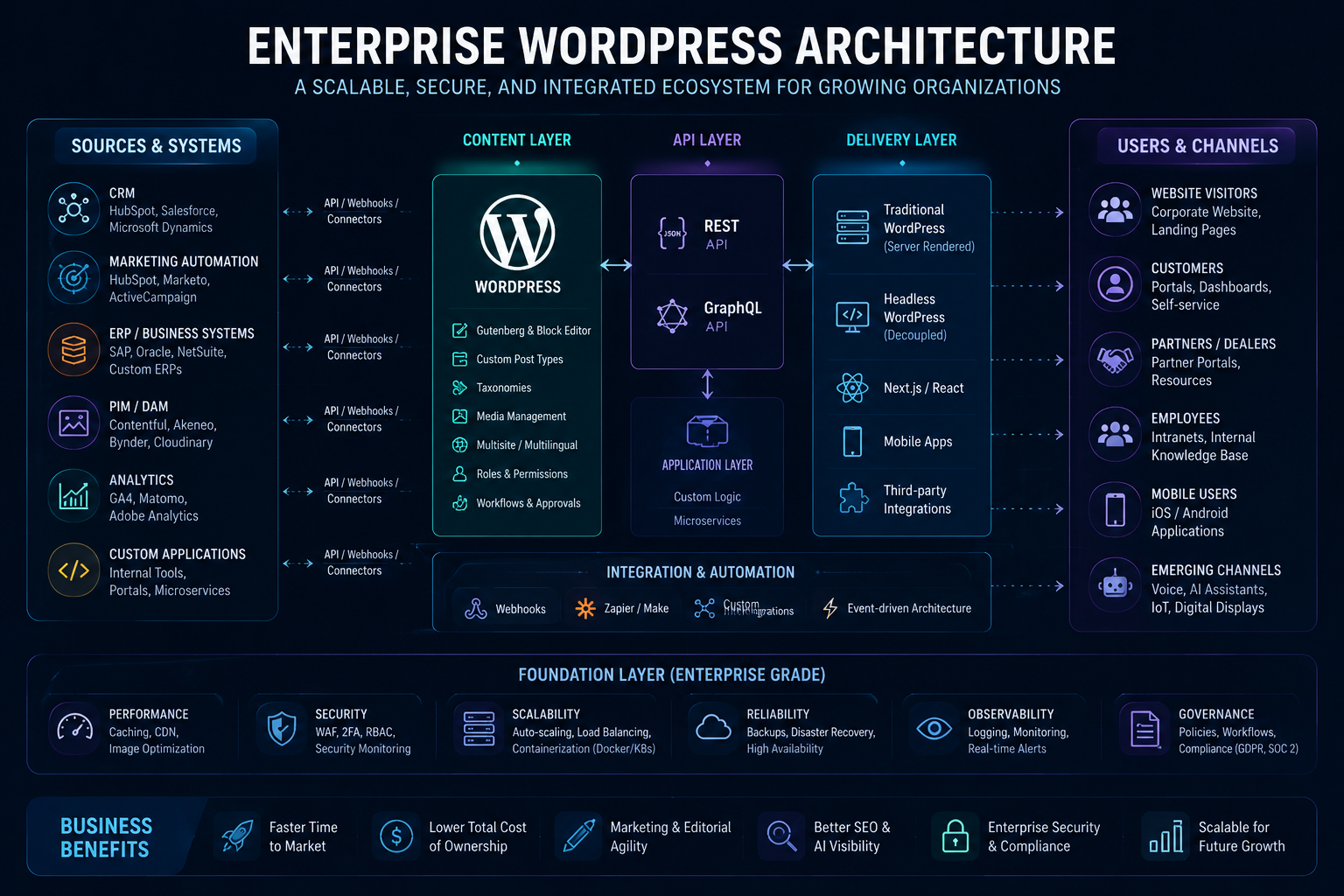
A modern enterprise WordPress architecture framework showing how content management, integrations, security, performance, governance, and AI visibility work together to support scalable business growth.
Enterprise WordPress Architecture
Architecture is one of the most important decisions in any enterprise WordPress project. The right architecture creates a foundation that can scale with business growth, while poor architectural decisions often become expensive technical debt.
An enterprise WordPress ecosystem typically consists of four key layers:
Enterprise Architecture Layers
- Content Layer – WordPress CMS
- API Layer – REST API or GraphQL
- Delivery Layer – Traditional or Headless Frontend
- Integration Layer – CRM, ERP, Analytics, DAM, PIM
| Layer | Purpose | Examples |
|---|---|---|
| Content Layer | Content management and publishing | WordPress CMS |
| API Layer | Content distribution and integrations | REST API, GraphQL |
| Delivery Layer | Frontend experience | WordPress Theme, React, Next.js |
| Integration Layer | Business systems connectivity | HubSpot, Salesforce, SAP |
Content Layer: WordPress as the Central CMS
The Content Layer serves as the operational center of your digital ecosystem.
This is where marketing teams, content creators, and administrators create, manage, and publish content.
Enterprise organizations often require:
- Thousands of content pages
- Multiple content teams
- Multi-language support
- Approval workflows
- Role-based permissions
- Reusable content components
Key Enterprise WordPress Features
Content Management
- Custom Post Types
- Custom Taxonomies
- Reusable Gutenberg Blocks
- Content Versioning
Scalability Features
- WordPress Multisite
- WPML / Multilingual Support
- Enterprise Media Libraries
- Global Content Governance
A well-structured Information Architecture (IA) is critical at this stage. Categories, navigation, taxonomies, and content relationships should be planned before development begins.
Best Practice:Design your content model for where the business will be in three years, not where it is today.
API Layer: The Foundation of Enterprise Integrations
The API Layer enables WordPress to communicate with other applications and services.
Modern enterprise websites rarely operate in isolation. Content often needs to be distributed across multiple platforms and business systems.
Common API Use Cases
- Mobile applications
- CRM synchronization
- Marketing automation
- Customer portals
- Partner portals
- External websites
- Data warehouses
WordPress API Options
| Technology | Use Case | Complexity |
|---|---|---|
| REST API | Most enterprise projects | Low |
| GraphQL | Headless implementations | Medium |
| Custom APIs | Specialized integrations | High |
The WordPress REST API remains the most widely adopted approach because it provides excellent flexibility while maintaining simplicity.
Delivery Layer: Traditional vs Headless WordPress
One of the most debated enterprise architecture decisions is choosing between a traditional WordPress implementation and a headless architecture.
Traditional WordPress
In a traditional setup, WordPress handles both content management and frontend rendering.
Advantages
- Faster development cycles
- Lower implementation cost
- Simpler maintenance
- Native preview functionality
- Strong SEO out of the box
- Single technology stack
For most enterprise organizations, traditional WordPress remains the most cost-effective and practical option.
Headless WordPress
Headless WordPress separates the CMS from the frontend application.
Content is managed in WordPress but delivered through frameworks such as React, Next.js, Vue, or Nuxt.
Advantages
- Maximum frontend flexibility
- Multi-channel content delivery
- Advanced application experiences
- Independent frontend scaling
Trade-Offs
- Higher development costs
- More complex deployments
- Additional SEO considerations
- Separate frontend maintenance
- More challenging preview workflows
Traditional vs Headless Comparison
| Criteria | Traditional WordPress | Headless WordPress |
|---|---|---|
| Development Cost | Lower | Higher |
| Maintenance | Simpler | More Complex |
| SEO Implementation | Easier | Requires Additional Setup |
| Content Editing | Excellent | Can Be More Complex |
| Performance Potential | High | Very High |
| Multi-Channel Delivery | Limited | Excellent |
Recommendation:Start with traditional WordPress unless there is a clear business requirement that justifies the additional complexity of a headless architecture.
Integration Layer: Connecting WordPress to Enterprise Systems
The real value of enterprise WordPress emerges when it becomes the content hub connecting critical business systems.
Common Enterprise Integrations
| System | Purpose | Examples |
|---|---|---|
| CRM | Lead management | HubSpot, Salesforce |
| Marketing Automation | Lead nurturing | Marketo, ActiveCampaign |
| Analytics | Performance tracking | GA4, Adobe Analytics |
| PIM | Product information | Akeneo, Pimcore |
| DAM | Asset management | Bynder, Cloudinary |
| ERP | Operational systems | SAP, NetSuite |
Integration Planning Checklist
- Identify data ownership
- Map data flows
- Define synchronization frequency
- Review API limitations
- Plan fallback procedures
- Test scalability under load
Integration planning should begin during discovery, not after development starts.
Governance: Keeping Enterprise Websites Organized
As websites grow, governance becomes increasingly important.
Without governance, content quality deteriorates, brand consistency weakens, and operational efficiency declines.
Governance Framework Components
- User roles and permissions
- Editorial workflows
- Publishing approvals
- Content ownership
- Brand guidelines
- Audit logging
Typical Workflow
Create → Review → Approve → Publish → Audit
Tools such as PublishPress can help organizations formalize editorial governance.
Enterprise Security Considerations
Security should be integrated into architecture decisions from the beginning rather than treated as a post-launch task.
Core Security Requirements
- Two-factor authentication
- Role-based permissions
- Firewall protection
- Malware scanning
- Automated backups
- Disaster recovery planning
- Security monitoring
- Compliance controls
Enterprise Security Checklist
| Area | Recommended Action |
|---|---|
| Authentication | Enable 2FA |
| Backups | Automated daily backups |
| Monitoring | Real-time alerts |
| Infrastructure | Managed hosting provider |
| Compliance | GDPR, SOC2, HIPAA where required |
Performance Optimization at Enterprise Scale
Performance directly affects user experience, SEO rankings, and conversion rates.
Enterprise websites require a proactive performance strategy.
Performance Optimization Framework
- Full-page caching
- Object caching (Redis)
- CDN implementation
- Image optimization
- Code minification
- Database optimization
- Core Web Vitals monitoring
| Metric | Target |
|---|---|
| Largest Contentful Paint (LCP) | < 2.5 seconds |
| Interaction to Next Paint (INP) | < 200ms |
| Cumulative Layout Shift (CLS) | < 0.1 |
DreamDev Insight
Most enterprise WordPress performance issues are not caused by WordPress itself. They are usually the result of poor hosting decisions, excessive plugins, inefficient code, or missing caching layers.
With the right architecture, WordPress can comfortably support millions of monthly visitors while maintaining excellent Core Web Vitals scores.
Enterprise SEO: Building Visibility at Scale
For enterprise organizations, SEO is not a marketing tactic. It is a business asset that compounds over time.
The most successful enterprise websites treat SEO as a foundational component of architecture, content strategy, and development rather than an afterthought.
Every technical decision made during planning and development influences future organic visibility.
Information Architecture and Internal Linking
Information Architecture (IA) determines how users and search engines navigate your website.
As websites scale into thousands of pages, a clear structure becomes critical.
Characteristics of Strong Enterprise IA
- Logical URL hierarchy
- Clear navigation structure
- Organized content categories
- Consistent taxonomy strategy
- Minimal orphan pages
- Strategic internal linking
Example Structure
- /services/
- /wordpress-development/
- /custom-wordpress-development/
- /headless-wordpress/
- /wordpress-hubspot-integration/
Search engines reward websites that make content easy to discover and understand.
Topic Clusters and Content Authority
Enterprise SEO is increasingly driven by topical authority rather than individual keyword rankings.
The most effective approach is building topic clusters around strategic business themes.
Every supporting article should link back to the pillar page while the pillar page links out to supporting resources.
This structure distributes authority across the cluster and helps search engines understand topical relationships.
Technical SEO Requirements
Technical SEO provides the foundation that allows enterprise content to rank effectively.
| Area | Best Practice |
|---|---|
| URLs | Clean, descriptive URLs |
| Sitemaps | Automated XML sitemaps |
| Navigation | Logical hierarchy |
| Schema | Structured data implementation |
| Redirects | Minimize redirect chains |
| Indexing | Eliminate orphan pages |
| Performance | Pass Core Web Vitals |
Technical SEO becomes increasingly important as content volume grows.
AI Search Optimization (GEO & AEO)
Search behavior is changing rapidly.
Traditional rankings remain important, but AI-driven experiences such as ChatGPT, Perplexity, Gemini, and Google AI Overviews are becoming a major source of visibility.
This shift requires organizations to optimize not only for search engines but also for AI systems.
What Is GEO?
Generative Engine Optimization (GEO) focuses on increasing the likelihood that AI systems reference, summarize, and cite your content.
What Is AEO?
Answer Engine Optimization (AEO) focuses on creating content that directly answers user questions in a format AI systems can easily understand.
Best Practices for AI Visibility
- Use question-based headings
- Create FAQ sections
- Implement structured data
- Use concise answer-first formatting
- Create topic clusters
- Use tables and lists
- Demonstrate expertise and authority
Important
AI systems prefer content that is structured, factual, easy to parse, and clearly organized.
Structured Data Strategy
Schema markup helps search engines and AI systems understand content relationships.
Recommended Schema Types
| Page Type | Schema Type |
|---|---|
| Homepage | Organization |
| Blog Posts | Article |
| Service Pages | Service |
| FAQ Sections | FAQPage |
| Navigation | BreadcrumbList |
Proper schema implementation increases eligibility for rich results and improves AI discoverability.
Enterprise WordPress Cost Breakdown
Enterprise projects involve significantly more planning, infrastructure, governance, and integration work than traditional business websites.
The total cost depends on project complexity, integrations, content volume, and long-term maintenance requirements.
| Category | WordPress | Drupal | AEM |
|---|---|---|---|
| Licensing | $0 | $0 | $250K–$1M+/year |
| Development | $150K–$500K | $250K–$600K | $500K–$1M+ |
| Hosting | $25K+/year | $30K+/year | Included |
| Maintenance | $12K–$50K+/year | $20K–$100K+/year | $100K+/year |
| Three-Year TCO | ~$600K+ | $800K–$1.5M+ | $1.5M+ |
Key Insight
WordPress consistently delivers the lowest total cost of ownership while maintaining enterprise-grade flexibility and scalability.
Real-World Enterprise Use Cases
Different industries require different capabilities, governance models, and integration strategies.
| Industry | Primary Requirements | Typical Solution |
|---|---|---|
| SaaS | Lead generation, CRM integration, content marketing | HubSpot + WordPress |
| Healthcare | Compliance, security, accessibility | HIPAA-compliant infrastructure |
| E-commerce | Product catalogs, traffic spikes | WooCommerce Enterprise |
| Manufacturing | Multi-language catalogs | Multisite + PIM Integration |
| Professional Services | Thought leadership and lead generation | SEO-driven content ecosystem |
Common Enterprise WordPress Mistakes
Even experienced organizations make avoidable mistakes that limit scalability and increase costs.
1. Choosing Technology Before Defining Requirements
Business goals should determine architecture decisions, not industry trends.
2. Plugin Overload
Installing excessive plugins increases security risks, maintenance overhead, and performance issues.
3. Weak Governance
Without workflows and ownership, content quality declines over time.
4. Underestimating Integrations
CRM, ERP, PIM, and marketing automation integrations often require more effort than expected.
5. Treating SEO as a Post-Launch Activity
Enterprise SEO begins during architecture and development planning.
6. Ignoring Long-Term Growth
Many organizations design for current requirements rather than future expansion.
Rule:Build for the business you expect to become, not only the business you are today.
Enterprise WordPress Development Checklist
Before starting an enterprise project, answer the following questions:
- What business objectives should the website support?
- How much traffic is expected?
- How many content contributors will use the platform?
- Which systems need to be integrated?
- Are multilingual capabilities required?
- What compliance requirements must be met?
- What are the Core Web Vitals targets?
- Is headless architecture truly necessary?
- How will governance be managed?
- Who will maintain the platform after launch?
Frequently Asked Questions
What is enterprise WordPress development?
Enterprise WordPress development is the process of designing, building, and maintaining large-scale WordPress websites that support complex business requirements, high traffic volumes, multiple content teams, advanced integrations, and strict security standards. Unlike traditional websites, enterprise WordPress platforms are built for long-term scalability, governance, and operational efficiency.
How much does enterprise WordPress development cost?
The cost of enterprise WordPress development varies significantly depending on project scope, integrations, custom functionality, and infrastructure requirements. Small enterprise projects may start around $15,000–$30,000, while large-scale implementations with complex integrations and custom workflows can exceed $250,000.
How long does an enterprise WordPress project take?
Most enterprise WordPress projects take between 3 and 12 months to complete. Timelines depend on the complexity of the website, the number of integrations, content migration requirements, stakeholder approvals, and testing processes.
Can WordPress handle millions of visitors?
Yes. WordPress can support millions of monthly visitors when combined with enterprise-grade hosting, CDN services, advanced caching, database optimization, and proper infrastructure planning. Many global brands and publishers successfully use WordPress at scale.
Is WordPress secure enough for enterprise organizations?
Yes. WordPress can meet enterprise security requirements when implemented with proper access controls, two-factor authentication, security monitoring, automated backups, managed hosting, and regular maintenance processes. Security depends more on implementation and governance than on the CMS itself.
Why do enterprises choose WordPress over other CMS platforms?
Organizations choose WordPress because it offers flexibility, scalability, strong SEO capabilities, lower licensing costs, a large developer ecosystem, and extensive integration options. Compared to proprietary platforms, WordPress often delivers a lower total cost of ownership while maintaining enterprise-grade functionality.
How does WordPress compare to Drupal?
WordPress typically offers a more user-friendly content editing experience, a larger ecosystem, and faster development cycles. Drupal may provide more advanced governance capabilities out of the box, but WordPress often requires less development effort and training for content teams.
How does WordPress compare to Adobe Experience Manager?
Adobe Experience Manager provides a comprehensive enterprise suite but comes with significant licensing and implementation costs. WordPress offers greater flexibility, faster deployment, and lower total cost of ownership, making it an attractive option for many enterprise organizations.
What is headless WordPress?
Headless WordPress separates content management from frontend presentation. WordPress functions as the content management system, while frameworks such as React, Next.js, or Vue handle the frontend experience. This approach provides greater flexibility but increases development complexity.
Should enterprises choose traditional or headless WordPress?
Traditional WordPress is the best choice for most organizations because it provides faster development, lower costs, and easier maintenance. Headless WordPress is recommended only when there are specific requirements for multi-channel content delivery, advanced applications, or highly customized digital experiences.
Can WordPress integrate with HubSpot?
Yes. WordPress integrates seamlessly with HubSpot for lead generation, CRM synchronization, marketing automation, form management, reporting, and customer lifecycle tracking.
Can WordPress integrate with Salesforce?
Yes. Enterprise WordPress websites frequently integrate with Salesforce to synchronize customer data, manage leads, automate workflows, and support sales and marketing operations.
Can WordPress integrate with ERP systems?
Yes. WordPress can integrate with ERP platforms such as SAP, NetSuite, Microsoft Dynamics, and Oracle through APIs, middleware solutions, and custom integrations.
Is WordPress suitable for multinational organizations?
Yes. WordPress supports multilingual websites, regional content management, localization workflows, and global content governance. Solutions such as WPML and WordPress Multisite make it possible to manage complex international websites efficiently.
What is WordPress Multisite?
WordPress Multisite is a feature that allows multiple websites to be managed from a single WordPress installation. It is commonly used by universities, franchises, corporations, and multinational organizations that require centralized governance across multiple sites.
What hosting is best for enterprise WordPress?
Enterprise websites typically benefit from managed cloud hosting environments that provide scalability, security, automated backups, monitoring, and performance optimization. Infrastructure should be selected based on expected traffic, compliance requirements, and business objectives.
What are the most important enterprise WordPress integrations?
Common enterprise integrations include CRM systems, marketing automation platforms, ERP software, product information management systems, analytics platforms, customer data platforms, and digital asset management solutions.
How important is SEO for enterprise WordPress websites?
SEO is one of the primary reasons enterprises choose WordPress. The platform provides strong technical SEO capabilities, flexible content management, schema implementation, and support for large-scale content marketing initiatives.
What is AI Search Optimization (AEO/GEO)?
AI Search Optimization refers to optimizing content so that AI-powered platforms such as ChatGPT, Perplexity, Gemini, and Google AI Overviews can easily understand, reference, and surface information from your website.
How can enterprises optimize WordPress for AI search?
Organizations should focus on structured content, FAQ sections, schema markup, topic clusters, clear headings, authoritative information, and strong internal linking. These elements improve visibility in both traditional search results and AI-generated answers.
What are the most common enterprise WordPress mistakes?
Common mistakes include weak governance processes, poor information architecture, plugin overload, underestimating integrations, ignoring performance optimization, and treating SEO as a post-launch activity.
How do enterprises maintain WordPress after launch?
Ongoing maintenance typically includes core updates, plugin management, security monitoring, performance optimization, content governance, backup management, infrastructure monitoring, and continuous SEO improvements.
When should a company migrate to enterprise WordPress?
A company should consider enterprise WordPress when its existing CMS limits growth, content operations become inefficient, integrations become difficult to manage, or the organization requires a scalable platform that supports long-term digital initiatives.
Final Thoughts
Enterprise WordPress development is not about building a larger website. It is about creating a scalable digital platform that supports business growth, content operations, marketing initiatives, and long-term innovation.
Organizations that succeed with WordPress focus on architecture, governance, integrations, performance, and SEO from the very beginning.
When these elements work together, WordPress becomes far more than a CMS. It becomes a strategic business asset capable of supporting growth for years to come.
Ready to Build an Enterprise WordPress Platform?
DreamDev helps growing businesses design, develop, and optimize enterprise-grade WordPress solutions focused on scalability, performance, security, and measurable business outcomes.
-
 WordPress Development
 Taking Over an Existing WordPress Website: A Technical Guide for Agencies
Taking over an existing WordPress website? This technical guide helps agencies assess infrastructure, code, security, integrations, SEO, performance, and technical risks before accepting responsibi...
25.06.2026 -
WordPress Development
How to Handle WordPress Development Overflow Without Hiring
Learn how to handle WordPress development overflow, add flexible capacity, and take on more projects without rushing into a full-time hire.
25.06.2026 -
Performance & SEO
AI-Ready WordPress Architecture: How to Prepare Your Website for AI Search
Search is changing. People are no longer relying only on short keyword queries to find information. They increasingly ask complex questions, compare solutions, and use AI-powered search experiences...
25.06.2026