

WordPress remains one of the most powerful content platforms in the world, but the way businesses use it is changing. For teams that need more speed, more flexibility, and more control over user experience, headless WordPress has become a serious option. DreamDev’s own positioning reflects this direction clearly: the team specializes in complex, scalable WordPress work, including custom builds, headless setups, and data-driven UX/UI.
That does not mean every website should go headless. In many cases, a well-built traditional WordPress site is still the smarter choice. But for businesses with complex content workflows, performance goals, or multi-channel digital strategies, headless WordPress can unlock a level of scalability that is difficult to achieve with a standard setup.
The real question is not whether headless WordPress is modern. The real question is whether it solves an actual business problem.
What headless WordPress really means
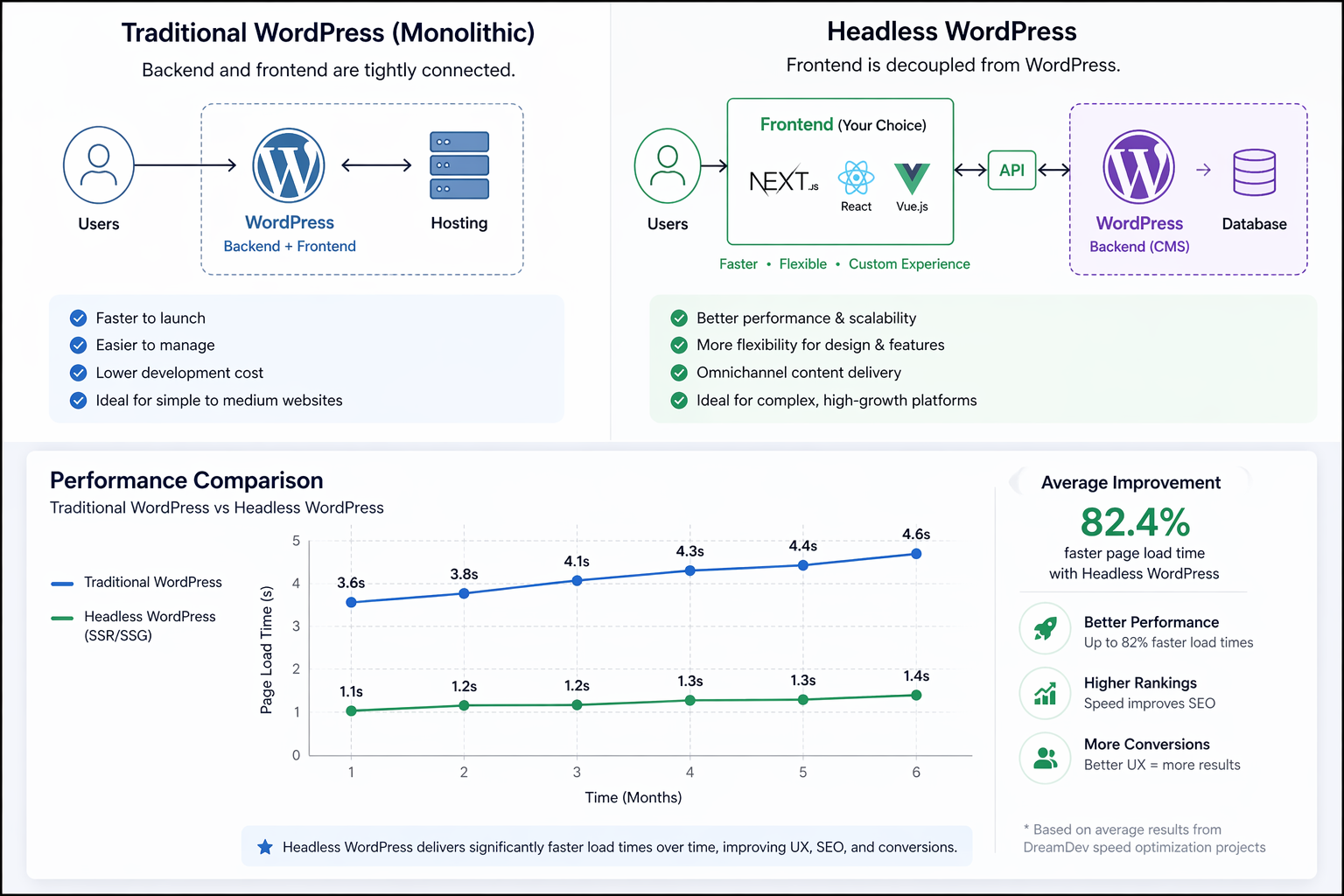
In a traditional WordPress setup, the backend and frontend are connected. You manage content in WordPress, and WordPress also renders the website visitors see.
In a headless setup, WordPress becomes the content management layer only. The frontend is built separately, often with frameworks like Next.js, React, or Vue, and content is delivered through APIs. Google notes that when content is generated with JavaScript, server-side rendering or static rendering is the safer long-term approach than dynamic rendering workarounds.
That separation creates more freedom for developers and designers. It can improve speed, support more advanced interfaces, and make it easier to reuse content across different platforms. At the same time, it adds complexity to development, deployment, and ongoing maintenance.
That is why headless architecture should be chosen strategically, not just technically.
When headless WordPress makes sense
Headless WordPress is a strong fit when a business needs one or more of the following:
A highly custom frontend experience.
Better performance at scale.
A content system that feeds more than one channel.
A more application-like user experience.
Greater flexibility for design and interaction.
This is why headless often appears in SaaS platforms, enterprise websites, publisher systems, and high-growth B2B brands.
For businesses like these, the website is no longer just a brochure. It is part of the product, the sales engine, and the user experience.
That is also where custom WordPress development becomes critical, because the site architecture has to support real business goals, not just a nice design.
DreamDev’s services explicitly include custom WordPress development, headless CMS work, code refactoring, migration, and business analysis for WordPress.
When traditional WordPress is the better choice
Headless WordPress is powerful, but it is not automatically the right answer.
If your business needs fast marketing iterations, a lower build cost, or a team that can manage content without developer dependency, a traditional WordPress site may be more efficient. The same is true if your current bottleneck is not architecture, but weak content, poor UX, or an overloaded plugin stack.
In other words, do not rebuild the entire system just because the site feels slow. Sometimes the right answer is smarter optimization, not a new stack.
That is where WordPress speed optimization and technical SEO for WordPress can solve much of the problem without introducing unnecessary complexity. Google’s SEO Starter Guide also emphasizes that helpful, well-organized, unique content, descriptive URLs, and relevant internal links all matter for discoverability.
Why performance matters so much
Performance is not a cosmetic issue. It affects engagement, rankings, and revenue.
When a site loads faster, users are more likely to stay, explore, and convert. Search engines also reward websites that deliver a better experience. Google’s guidance is clear that SEO is about helping search engines understand content and helping users find it, and that logical site organization and good links help both users and crawlers.
For headless websites, performance can be excellent when the implementation is done well. Static generation, server-side rendering, and modern caching strategies can produce very fast pages. But if the frontend is built carelessly, headless can also become slower and harder to maintain than a traditional WordPress site.
That is why performance should be planned from the beginning, not fixed later.
UX is not separate from architecture
One of the biggest advantages of headless WordPress is UX freedom. When the frontend is decoupled from the CMS, designers and developers can create more tailored interfaces, smoother interactions, and cleaner user journeys.
That matters because UX is part of SEO and conversion performance. If visitors cannot quickly understand where to go, what to do, or why the page matters, they leave.
A strong user experience should support:
- clear navigation
- readable content hierarchy
- fast interactions
- mobile-first layouts
- consistent visual patterns
- accessible design
This is where WordPress UX/UI design becomes a business asset, not just a design deliverable. DreamDev’s UX/UI service pages emphasize intuitive, high-converting WordPress experiences, wireframing, prototyping, usability improvements, and design support for SaaS, WooCommerce, and corporate sites.
Business analysis comes before development
A lot of projects fail because they start with visuals instead of strategy. Before choosing headless or traditional WordPress, the team should understand the business model, user needs, content structure, and technical requirements.
That is the role of business analysis for WordPress.
A strong discovery phase helps answer questions like:
- What is the website supposed to achieve?
- Which user journeys matter most?
- Which integrations are required?
- What content needs to be reusable?
- Where are the current performance bottlenecks?
- What will the site need in 12 to 24 months?
When those questions are answered early, the final build is more stable, more scalable, and far less expensive to maintain.
SEO considerations for headless WordPress
Headless WordPress can be excellent for SEO, but only when the implementation is done properly.
The main risk is rendering. If important content is only loaded client-side and search engines cannot access it reliably, rankings can suffer. Meta data, canonical tags, structured data, and internal links also need to be handled with care. Google’s structured data documentation says structured data helps search engines understand a page more explicitly and may enable richer search results, while also noting that correct markup does not guarantee rich results.
A headless setup should support:
- server-side rendering or static generation
- clean, indexable URLs
- correct metadata on every page
- structured data implementation
- crawlable internal linking
- image optimization
- strong page speed
When these pieces are in place, headless WordPress can combine strong UX with strong SEO performance.
Real-world DreamDev results
DreamDev’s own site gives strong proof that this is not just theory. The team highlights an average result of 82.4% across speed optimization cases, and its portfolio includes the MN2S project, an international music and talent agency with 21,000+ pages. DreamDev also showcases the Thruuu redesign, where the platform reached 16k+ monthly views, 200+ visitors per day, and a 27% traffic increase one week after launch.
Trust signals on the site are also strong: 769+ jobs on Upwork, 100% Job Success, 93% returning clients, and 40,000+ work hours are all prominently featured. That kind of proof helps turn a blog post from generic advice into a credible expert resource.
For readers evaluating a technical partner, this matters. It shows that DreamDev is not just writing about scalable WordPress architecture, UX, and SEO. The team is already delivering it.
Cost and ROI
Headless WordPress usually costs more upfront than a standard WordPress build. You are not just paying for a CMS and a theme. You are building a separated frontend, integrating APIs, and often creating a more custom deployment workflow.
That extra cost can be justified when:
- performance directly affects revenue
- the site supports complex user journeys
- multiple teams need to publish content efficiently
- the frontend must evolve independently from the CMS
- the business expects scale
For smaller marketing sites, the ROI may not be strong enough. For product-driven or enterprise teams, it often is.
The key is to evaluate cost against outcome, not against trendiness.
How agencies and enterprise teams benefit
Agencies and enterprise teams often have the most to gain from a headless or hybrid approach, but they also need the most structure.
They usually care about:
- repeatable architecture
- faster delivery
- flexible content management
- better cross-team collaboration
- strong technical foundations
- lower risk during scaling
That is why support for marketing and SEO agencies often includes more than development. It also includes architecture planning, technical SEO, optimization, and reliable ongoing implementation. DreamDev positions itself exactly this way, offering support for marketing agencies, SEO agencies, branding agencies, and creative studios.
The decision framework: headless or traditional WordPress?
Use this simple filter before making a decision.
Choose headless WordPress when:
- your frontend needs advanced custom behavior
- performance at scale is a top priority
- you need content reused across multiple channels
- your team can support more technical maintenance
Choose traditional WordPress when:
- speed to launch matters most
- you want simpler content operations
- your team needs a lower-maintenance system
- the current issue is optimization, not architecture
The best solution is the one that fits the business, the team, and the roadmap.
A practical checklist before you build
Before starting a new WordPress project, make sure you have answers to these points:
- What business goal does the site support?
- What type of architecture does the project really need?
- Is performance best solved through optimization or rebuild?
- Do we need custom frontend logic?
- What content and SEO structure should be planned now?
- Which services and pages should be connected internally?
This is the point where good planning saves months of work later.
FAQ
Is headless WordPress good for SEO?
Yes, when it is implemented with server-side rendering or static generation, clean URLs, proper metadata, and crawlable internal links. Without those pieces, SEO can suffer. Google’s documentation on JavaScript rendering and structured data supports this approach.
When should a business choose headless WordPress?
Headless makes the most sense when a site needs a highly custom frontend, stronger scale, or content delivery across multiple channels. For simpler marketing sites, traditional WordPress is often more practical.
Is headless WordPress more expensive than traditional WordPress?
Usually yes, because it adds frontend engineering, API integration, and a more complex maintenance setup. The tradeoff can still be worth it for larger businesses with clear performance or scalability goals.
Can WordPress still be used for content in a headless setup?
Yes. In a headless architecture, WordPress remains the content management layer while the frontend is built separately. That is one of the core reasons teams choose it.
What is the safest alternative to headless WordPress for many businesses?
A well-structured traditional WordPress build with strong UX/UI, speed optimization, accessibility, and technical SEO is often the best balance of cost, simplicity, and performance. Google’s SEO guide stresses helpful content, logical structure, descriptive URLs, and strong internal links.
Final thoughts
Headless WordPress is not a magic upgrade. It is a strategic architecture choice. For the right project, it can improve performance, flexibility, and scalability in a way that traditional setups cannot. For the wrong project, it can add cost and complexity without meaningful gain.
The smartest websites are not the most technical ones. They are the ones that fit the business, support the user, and perform well in search.
That is why the best WordPress strategy in 2026 is not “headless by default.” It is “right architecture for the right problem.”
For teams that want to grow with a stronger technical foundation, better UX, and more SEO-ready structure, the next step is not more plugins. It is smarter planning and expert execution.