
What Happens After a WordPress Website Goes Live? The Work Nobody Plans For
WordPress Development


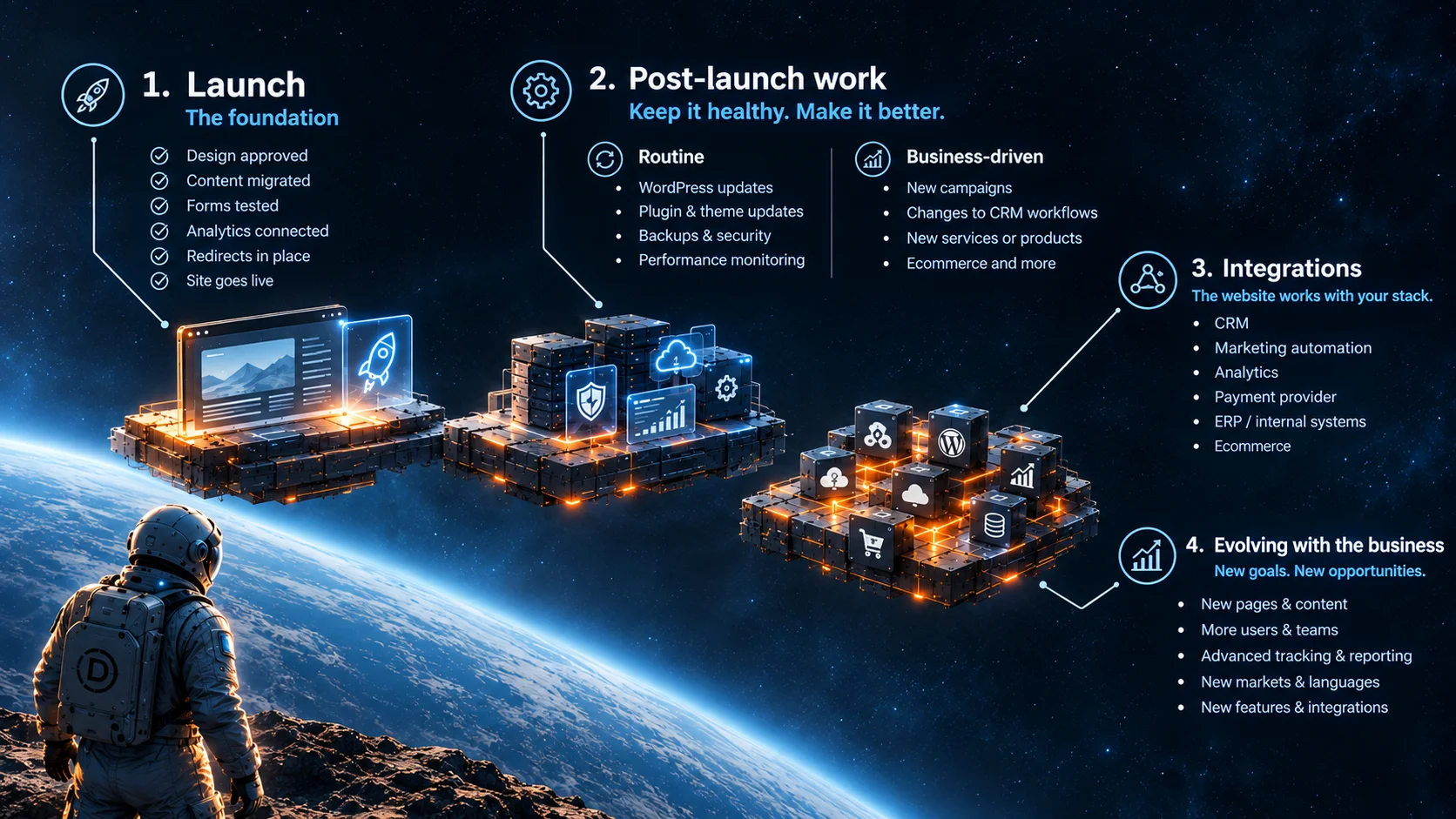
Launching a new WordPress website usually comes with a clear definition of done. The design is approved, the content is migrated, forms are tested, analytics is connected, redirects are in place, and the new site goes live.
At that point, the project is often considered finished.
In reality, that is when another kind of work begins.
A marketing team asks for a new landing page. Sales wants additional information captured from a form. A CRM workflow changes and the website needs to send different data. A plugin update introduces a compatibility problem. The company launches a new service and the existing content structure no longer fits it.
None of these requests necessarily means that the original website was built badly. They are simply consequences of the business continuing to change after the original project scope has ended.
That distinction matters because a WordPress website is rarely a static deliverable. Once it becomes part of marketing, sales, analytics, ecommerce, or internal workflows, it becomes an evolving technical system.
And the work required to keep that system useful is often underestimated.
A Website Launch Is a Snapshot of the Business
A website reflects the business requirements that existed when it was planned.
Imagine a B2B company launching a WordPress site with 30 pages, several lead forms, analytics, and a simple CRM connection. At launch, the architecture may be perfectly appropriate.
Two years later, the same company might have 300 pages, several content teams, multiple lead-generation funnels, a more sophisticated HubSpot setup, new services, international content, and additional tracking requirements.
The website may still be running on essentially the same foundation.
That does not necessarily mean it needs to be replaced. It means the relationship between the website and the business has changed.
This is one of the most overlooked aspects of WordPress development. The original project solves a defined set of requirements. The business then continues generating new requirements, often faster than anyone anticipated.
The technical challenge is not simply keeping the old website alive. It is allowing the website to evolve without turning every change into a new project.
The First “Small Request” Usually Changes More Than It Seems
Consider a simple example.
A marketing manager wants to add a qualification question to an existing lead form.
On a basic website, that could genuinely be a small change. But suppose the form is connected to HubSpot. The new answer now needs to be mapped to a CRM property, included in lead routing, reflected in reporting, and handled correctly when the field is empty.
The frontend change may take minutes. Making sure the entire workflow still behaves correctly can take considerably longer.
This is why the effort involved in post-launch work is often difficult to estimate from the visible change alone.
The website is no longer just a collection of pages. It is part of a business process.
For more complex WordPress and HubSpot integrations, the technical work can involve custom data mapping, APIs, webhooks, validation, business logic, and multiple connected systems. WordPress + HubSpot Integration Guide
Once a website reaches that level of integration, technical support is no longer just about fixing broken pages.
It is about understanding what a change means for the system as a whole.
Post-Launch Work Has Its Own Lifecycle
There is a useful way to think about what happens after launch.
The initial project establishes the foundation.
Post-launch work then develops that foundation in response to real-world use.
Some of that work is routine. WordPress core, plugins, and themes need to be kept current. Backups and security need attention. Performance needs to be monitored.
Other work is driven by the business itself.
Marketing introduces a new campaign. Sales changes its qualification process. The company adds an ecommerce function. A CRM workflow is redesigned. A third-party API changes. A new content type becomes necessary.
These requests are not necessarily defects in the original website. They are evidence that the business has moved on.
A good post-launch strategy therefore needs to accommodate two different types of change: changes required to keep the existing system healthy and changes required to make the system do something new.
The second category is where many maintenance plans become insufficient.
When Integrations Become Part of the Website’s Architecture
A modern business website rarely works alone.
WordPress may connect to a CRM, marketing automation platform, analytics stack, payment provider, ERP, ecommerce system, or internal application. The more connections there are, the less useful it becomes to think about the website as an isolated CMS.
An integration can also remain invisible until something changes.
A CRM property is renamed. An API endpoint is deprecated. Authentication requirements change. A plugin introduces a new data structure. A marketing workflow starts requiring information that the original form never collected.
The website may still look completely normal to a visitor.
Behind the scenes, however, the business process can be failing.
That is why integration work after launch often requires more than troubleshooting the WordPress side. Someone needs to understand the data flow, the systems involved, and what the business expects to happen when the connection works correctly.
For larger websites, this becomes part of the broader enterprise WordPress architecture, where the CMS may sit at the center of a much wider technology ecosystem.
Enterprise WordPress Development Guide
Updates Become More Important as the Stack Gets More Complex
WordPress websites need updates for security, compatibility, and maintenance. That has always been true, but the consequences of an update can become more significant as the technical stack grows.
A simple site may have little to test after a WordPress or plugin update.
A complex site may have custom theme code, advanced plugins, WooCommerce functionality, third-party APIs, custom JavaScript, and CRM integrations that all need to continue working together.
That does not mean updates should be delayed. It means the process around those updates needs to become more deliberate.
On a mature website, a production update may involve a staging environment, compatibility checks, regression testing, and a rollback strategy.
The important distinction is between updating software and managing an update safely.
The more business-critical the website becomes, the less attractive the “update first and see what happens” approach becomes.
Technical Debt Usually Arrives Quietly
Most WordPress technical debt does not begin with a bad decision.
A developer needs to solve a problem quickly, so a small custom function is added.
A plugin is installed because it provides a feature the business needs immediately.
A temporary workaround is introduced for a campaign.
A custom integration is built around an existing workflow.
A year later, all of those decisions are still there.
The problem is not that any individual decision was necessarily wrong. The problem is that the system has accumulated layers that were designed at different points in its history.
Eventually, developers need more time to understand the consequences of a change before they can implement it.
That is when technical debt starts becoming a business problem.
A change that once took an hour now takes a day because someone has to investigate what else might depend on it.
The website has not necessarily become “bad.” It has become harder to change safely.
The Development Backlog Can Reveal the Problem
Another common signal appears in the development backlog.
There are always requests waiting.
Some are large. Others are small.
A new landing page is waiting behind a plugin compatibility fix. A CRM change is waiting behind a performance issue. A template adjustment keeps getting postponed because a more urgent production problem appeared.
Eventually, marketing starts planning around development capacity instead of around business opportunities.
That is a significant shift.
The problem may not be that the development team is inefficient. The website may simply require too much specialist attention for the amount of change the business is generating.
This is also why adding more development hours does not automatically solve the problem. If the underlying architecture makes routine changes unnecessarily difficult, more capacity can simply mean more people working around the same constraints.
Sometimes the more important question is:
Why does this website require so much engineering effort for changes that the business now considers routine?
Performance Problems Can Return as the Website Evolves
Post-launch performance deserves a similar perspective.
A website can be optimized successfully and still become slower over time.
More content is added. New scripts are introduced. Third-party services become part of the marketing stack. The database grows. Custom functionality accumulates. Traffic patterns change.
Eventually, the original optimization work may no longer address the current bottleneck.
This is why performance should be treated as an ongoing technical concern rather than a one-time launch task.
A useful performance process starts with diagnosis: identifying whether the current bottleneck is related to hosting, server response, database queries, JavaScript, images, third-party services, or the architecture itself.
For a deeper look at that diagnostic approach, see the WordPress Speed Optimization Guide.
The important point is that post-launch performance work is not necessarily about making the website “faster” every few months.
It is about making sure growth does not quietly introduce new bottlenecks.
Not Every Problem Calls for a Rebuild
When a website becomes difficult to change, rebuilding everything can seem like the obvious answer.
It is not always the right one.
A site may have a solid core architecture with only a few problematic components. A fragile integration can be replaced without rebuilding the frontend. An inefficient database query can be fixed without redesigning the website. A poorly structured custom feature can be refactored rather than discarded.
The right response depends on what is actually creating the friction.
Sometimes the answer is a focused technical improvement.
Sometimes it is architectural refactoring.
Sometimes the business genuinely has outgrown the existing structure and a larger rebuild makes sense.
The important thing is to diagnose the constraint before deciding on the scale of the solution.
The Missing Layer Between Maintenance and a New Project
This is where many businesses find themselves after a website has been live for a while.
Routine maintenance is not enough.
But starting a new development project for every change would be inefficient.
There is a large middle ground.
It includes work such as improving a CRM integration, refactoring custom functionality, adding a new API connection, adapting the site to a new marketing workflow, investigating recurring compatibility issues, improving the content architecture, or addressing technical debt before it becomes a larger problem.
These tasks are too technical to be treated as routine content updates, but they do not necessarily justify a completely new website project.
This is the space where ongoing technical support becomes valuable.
The purpose is not simply to have someone available when the site breaks. It is to have technical expertise available when the business needs the website to change.
What Good Post-Launch Support Actually Looks Like
Good support should make change less risky and less disruptive.
That starts with visibility.
The team should know how the website is structured, which integrations are business-critical, where custom functionality lives, how deployments are handled, and what should be tested before changes reach production.
It also requires prioritization.
Not every technical debt item needs to be fixed immediately. Not every new request deserves a custom solution. Sometimes a workaround is reasonable; sometimes it creates a dependency that will become expensive later.
The role of an experienced technical team is to understand those trade-offs and help the business make them deliberately.
That is different from simply closing tickets.
The goal is to keep the website understandable, stable, and adaptable as requirements change.
A Simple Framework for Post-Launch WordPress Work
A useful way to think about the ongoing lifecycle is through five layers:
Maintain
Keep the existing system secure, stable, updated, and operational.
Improve
Remove performance bottlenecks, technical debt, and unnecessary complexity.
Integrate
Adapt the website as CRM, analytics, ecommerce, APIs, and other business systems change.
Extend
Add new capabilities as the business develops new products, services, workflows, or markets.
Rebuild
Replace part or all of the system when the existing architecture genuinely becomes the constraint.
The important part is that these are not five competing strategies.
A growing website can move through all of them over time.
The mistake is assuming that every post-launch problem belongs in only one category.
The Website Should Evolve With the Business
The most successful WordPress websites are not necessarily the ones that never need development after launch.
They are the ones that can accommodate change without turning every new business requirement into a crisis.
A website launched three years ago should not be expected to remain technically identical to the system the business needs today.
The company may have new products, new markets, new marketing channels, new integrations, and new expectations from its customers.
The website has to evolve with all of them.
That does not necessarily mean adding more plugins, more features, or more complexity. In many cases, it means periodically stepping back and asking whether the technical foundation still supports the way the business operates.
If it does, the job is to maintain and improve it.
If it does not, the next step may be refactoring, replacing a specific component, or eventually rebuilding part of the system.
The important thing is to make that decision based on the current business and technical reality rather than waiting until the website becomes a bottleneck.
The Work After Launch Is Part of the Product
A WordPress website is often treated as a finished product when it goes live.
For a growing business, that is rarely how it behaves in practice.
The website becomes a working part of the organization. It collects leads, supports campaigns, connects systems, publishes content, handles transactions, and changes as the business changes.
That means the work after launch is not an afterthought.
It is part of the website’s lifecycle.
The question is not whether a WordPress website will need changes after launch. It will.
The more useful question is whether those changes can be made deliberately, safely, and without slowing the business down.
For some companies, that means building stronger internal engineering capacity. For others, it means working with an external team that can handle everything from ongoing development and integrations to code review, refactoring, and performance work.
The goal is the same: keep the technical foundation aligned with the business it supports.
If that is the gap your team is dealing with, explore DreamDev’s ongoing WordPress technical support for agencies and digital teams.
WordPress Support for Agencies and Digital Teams
A WordPress launch may be a project.
Keeping the website useful, stable, and adaptable as the business evolves is an ongoing engineering process.
Frequently Asked Questions
What should happen after a WordPress website goes live?
After launch, a WordPress website needs ongoing updates, security monitoring, backups, performance checks, bug fixes, and development as business requirements change. More complex websites may also require continuous integration, refactoring, and architectural work.
Is WordPress maintenance the same as ongoing development?
No. Maintenance focuses primarily on keeping the existing system secure, stable, and operational. Ongoing development changes what the website can do, such as adding integrations, new workflows, custom functionality, or new content capabilities. In practice, many growing websites need both.
When does a WordPress website need ongoing technical support?
Ongoing technical support becomes useful when a website is business-critical, has multiple integrations, requires frequent changes, contains custom functionality, or has become too complex for routine maintenance alone.
Does every WordPress website eventually need a rebuild?
No. Many websites can continue to evolve through targeted improvements, refactoring, and component-level changes. A rebuild makes more sense when the existing architecture has become a fundamental constraint on the business.
Why do WordPress websites become harder to maintain over time?
Complexity usually accumulates gradually. New plugins, custom code, integrations, content, workflows, and workarounds can create dependencies that make later changes more difficult. This is one of the main ways technical debt develops.
How often should a WordPress website be updated?
There is no single schedule that applies to every website. WordPress core, plugins, themes, and other components should be monitored and updated according to their security and compatibility requirements, with more controlled testing for complex or business-critical websites.
Can a WordPress website be supported without rebuilding it?
Yes. Many websites can be supported and improved without a full rebuild. Technical audits, code refactoring, integration improvements, performance optimization, and targeted development can often extend the useful life of an existing WordPress system.
What is the difference between WordPress support and WordPress maintenance?
Maintenance generally focuses on keeping the current website operational. Support can cover a broader range of technical needs, including troubleshooting, development, integrations, refactoring, performance optimization, and adapting the website to new business requirements.
-
 WordPress Development
 Taking Over an Existing WordPress Website: A Technical Guide for Agencies
Taking over an existing WordPress website? This technical guide helps agencies assess infrastructure, code, security, integrations, SEO, performance, and technical risks before accepting responsibi...
30.09.2026 -
WordPress Development
How to Handle WordPress Development Overflow Without Hiring
Learn how to handle WordPress development overflow, add flexible capacity, and take on more projects without rushing into a full-time hire.
30.09.2026 -
Performance & SEO
AI-Ready WordPress Architecture: How to Prepare Your Website for AI Search
Search is changing. People are no longer relying only on short keyword queries to find information. They increasingly ask complex questions, compare solutions, and use AI-powered search experiences...
30.09.2026