
How to Know When Your WordPress Website Needs an Enterprise Architecture
Business Analysis Insights WordPress Development

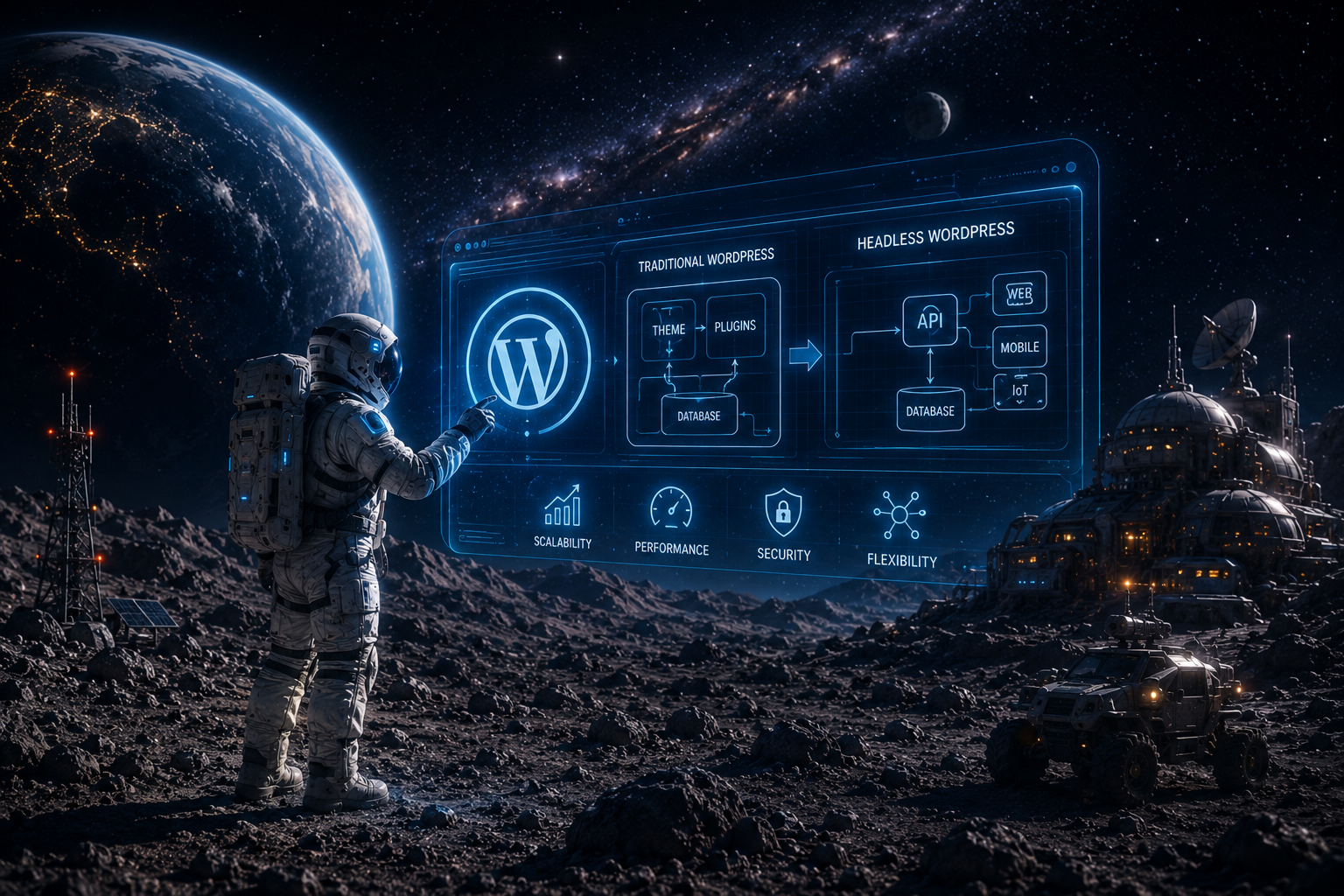
Most enterprises do not outgrow WordPress because WordPress suddenly stops working. They outgrow it because the original architecture was built for publishing speed and editorial simplicity, while enterprise businesses need governance, performance, integrations, and scale. WordPress is still a strong platform, but its core model is intentionally simple, and advanced capabilities are usually layered on through plugins or custom WordPress development. That works well until complexity becomes the norm rather than the exception.
For many companies, the answer is not to abandon WordPress. The answer is to stop treating it like a small website tool and start treating it like an enterprise system. That means clear architecture, disciplined development, better infrastructure, and, in some cases, a decoupled or headless approach. Enterprise teams that make that shift gain more flexibility, better performance, and a cleaner path for long term growth.
Why traditional WordPress can limit enterprise growth
Traditional WordPress is excellent for speed to launch. It is editorial friendly, flexible, and familiar to marketers and content teams. But a monolithic setup can become limiting when the business grows beyond a single site, a single workflow, or a single frontend.
The biggest limitation is the content model. WordPress is designed around a publishing centric structure, and while custom post types, metadata, and blocks extend that model, advanced workflow management, granular permissions, multilingual delivery, and structured content relationships are usually added through plugins or custom code. Complexity is possible, but it is not enforced by default.
Performance becomes another issue. Traditional WordPress often renders pages through the theme layer on every request, which means traffic growth, publishing volume, and custom functionality all increase pressure on the stack. A WordPress site can still be secure and still feel slow, and for enterprise users that matters because speed affects user experience, SEO, conversion rates, and confidence in the platform.
The coupling between frontend and backend is also a constraint. In a standard setup, design decisions, presentation logic, and content delivery are all tied together. That makes changes easier at first, but it slows innovation later. Contentful notes that a monolithic CMS can limit omnichannel flexibility, increase time to publish, and lead to costly rework when changes are made.
Plugin sprawl creates a fourth problem. Many enterprise sites accumulate feature after feature through plugins, and each one adds maintenance, dependency risk, and possible security exposure. DreamDev’s own guidance emphasizes that enterprise WordPress should not be overloaded with plugins and shortcuts, but built with a clear structure, lean code, and long term maintainability in mind.
Signs your enterprise is outgrowing WordPress
There are clear warning signs that your WordPress site has moved beyond its original architectural fit.
If traffic spikes create slow pages or timeouts, the stack is likely under strain. If Core Web Vitals remain weak even after basic optimization, the issue is probably deeper than simple caching. If teams keep patching the site with plugins or custom fixes, technical debt is already accumulating. If security reviews uncover too many vulnerabilities or unclear access control, the platform has likely outgrown its current operating model.
Another strong signal is workflow friction. When marketing, product, and engineering cannot move independently, every change becomes a coordination problem. When new regions, brands, or content types take too long to launch, the CMS is no longer supporting scale. Open Channels reports that many enterprises now run multiple CMS platforms, often combining WordPress with legacy systems to support faster and more flexible content creation. That trend reflects a broader reality, single stack setups often cannot meet every enterprise need alone.
The key point is simple. When these patterns appear, the next step is not panic. It is architectural evaluation.
Traditional WordPress versus enterprise grade WordPress
A traditional WordPress setup is a single stack system. Content, theming, rendering, and much of the logic live close together. That is efficient for smaller teams, but it can become rigid as the business grows.
An enterprise grade setup separates content management from presentation, introduces stronger infrastructure, and makes integrations more modular. In practice, that often means headless or hybrid architecture, better deployment discipline, and a more API first approach. Headless WordPress allows the backend to manage content while the frontend is built separately, often with a modern JavaScript framework. That gives developers more freedom while preserving the editorial ease that teams value.
| Area | Traditional WordPress | Enterprise Grade WordPress |
|---|---|---|
| Architecture | Content, theme, and rendering live in one system | Content is separated from presentation |
| Frontend | Theme based and tightly connected to WordPress | Built independently with modern frontend tools |
| Scalability | Improves mostly through stronger hosting and manual tuning | Scales through APIs, infrastructure, and decoupling |
| Performance | Can slow down under load if not carefully optimized | Better suited for high traffic and fast delivery |
| Security | Often depends on plugins and patching discipline | Uses layered security and reduced exposure |
| Integrations | Often handled through plugins or custom PHP | API first and built for system connectivity |
| Workflow | Editorial friendly, but sometimes limited | Designed for structured publishing and team collaboration |
| Best fit | Small to mid sized websites and standard content sites | Large brands, SaaS companies, media, and complex platforms |
This is why many enterprises adopt hybrid or composable models. They do not discard WordPress. They evolve it.
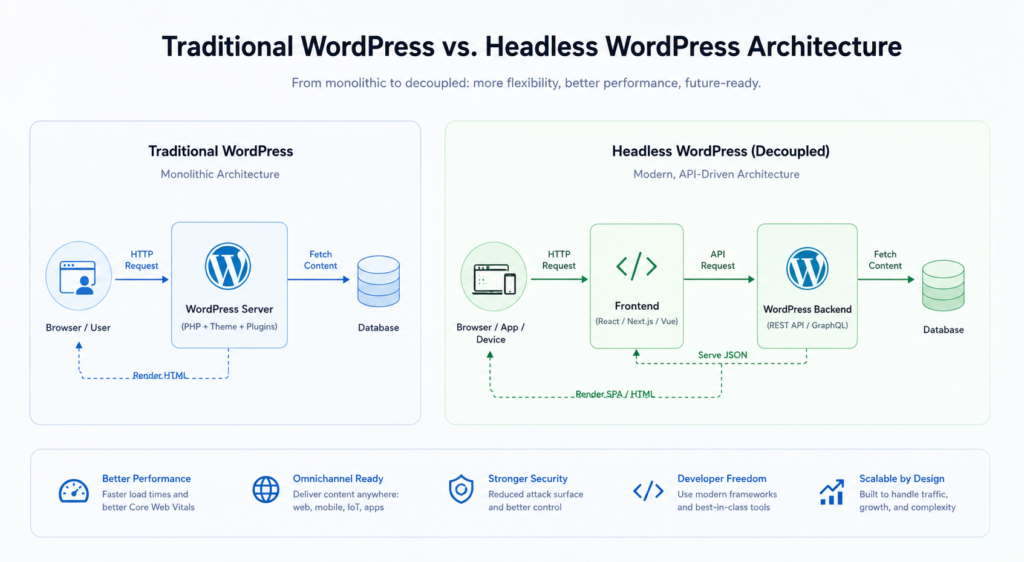
Why headless WordPress becomes attractive at scale
Headless WordPress is not a trend for its own sake. It is a practical answer to enterprise problems.
A headless setup can improve performance because the frontend is no longer tied to every part of the WordPress theme layer. It can improve security posture because the public facing experience is separated from the content system. It can also support omnichannel delivery, which matters when one content source needs to power multiple digital touchpoints. Kontra notes that in a headless setup, the API becomes the main doorway between the frontend and WordPress, which reduces exposure compared with a traditional setup.
Contentful’s composable DXP view reinforces the same point. When content is separated from presentation, teams can deliver experiences more flexibly and reduce costly rework when business requirements change. That is especially valuable for enterprise organizations that need to move quickly without constantly rebuilding the same experience in multiple places.
That said, headless is not the right answer for every site. It introduces architectural and operational complexity of its own. The right decision depends on the business model, the content model, the team structure, and the growth plan.
Building a scalable WordPress infrastructure
Whether a company stays with traditional WordPress or moves toward a decoupled model, enterprise reliability depends on infrastructure.
A scalable setup starts with hosting and CDN strategy. Static assets should be served efficiently, and global performance should not depend on a single origin server. Database tuning and caching are equally important. Redis, Memcached, and optimized MySQL can remove major bottlenecks before they become visible to users. For larger sites, careful query optimization and smarter caching layers are essential.
Automation matters too. Enterprise teams need CI/CD workflows, staging environments, monitoring, and rollback planning. Without release discipline, every change becomes risky. Security should also be designed in from the start, not added after the fact. DreamDev explicitly frames security that way, and that principle is especially important when enterprise sites have multiple teams, integrations, and external dependencies.
This is the real difference between a basic website and an enterprise platform. The website is not just a page renderer anymore. It is a product that needs engineering discipline.
When to consider headless or hybrid architecture
Not every company needs to rebuild everything. In fact, Pantheon notes that migrating away from WordPress is usually justified only when organizational needs outgrow WordPress’s architectural assumptions, and that a pre migration assessment should determine whether optimizing the current implementation would achieve the same outcome with less disruption.
That is the right mindset for enterprise decision makers. A full migration should be the result of analysis, not frustration.
Headless or hybrid architecture becomes the stronger option when:
- the same content must appear across websites, apps, kiosks, or other channels
- the frontend needs more speed or more advanced interaction
- developers need to work independently from content teams
- the current setup has too much technical debt
- the company needs a more composable digital stack
Open Channels’ enterprise discussion shows that many organizations are already moving toward multi CMS strategies and more flexible content operations. That trend makes a strong case for architectures that can integrate rather than isolate.
Migration and upgrade roadmap
A smart migration is phased, measured, and low risk.
Phase 1. Audit and strategy
Document the current architecture, measure performance, identify bottlenecks, and define the business goals. Do not start with tools. Start with requirements. DreamDev’s business analysis approach aligns with this mindset.
Phase 2. Architecture design
Choose whether the right answer is optimization, hybrid architecture, or full headless delivery. Map content types, workflows, integrations, and security requirements before implementation starts.
Phase 3. Implementation
Build the backend, frontend, and integration layer in a way that protects content operations. If WordPress remains the content layer, ensure editors keep a familiar workflow while developers gain more flexibility.
Phase 4. Testing and launch
Test functionality, redirects, metadata, content migration, and key user journeys. DreamDev’s migration guidance emphasizes preserving SEO and content integrity, resolving database conflicts, and keeping URLs indexed without downtime or data loss.
Phase 5. Optimization and support
After launch, continue tuning performance, improving workflows, and hardening security based on real usage data. Enterprise architecture is never a one time task.
Why DreamDev Solutions is a Strong Fit for Enterprise Architecture
DreamDev Solutions works with WordPress projects that need more than a standard theme and a few plugins. That includes custom architecture, headless WordPress, performance optimization, integrations, and large scale migrations. The focus is not on making WordPress look advanced. The focus is on making it behave like an enterprise system. DreamDev’s own service pages emphasize secure, scalable architecture, headless implementations, and migration work that preserves SEO and traffic.
For enterprises, that matters. A partner should not only build pages. A partner should help design a platform that can survive growth.
Conclusion
Enterprises do not outgrow WordPress because WordPress is weak. They outgrow it because the business becomes more complex than the original architecture was designed to support.
Traditional WordPress can still be the right answer, especially when the site is well engineered and operationally disciplined. But when performance, security, integrations, and workflow complexity increase, the smarter move is to evolve the architecture, not just keep adding plugins.
That is where headless and hybrid approaches become valuable. They preserve what teams like about WordPress while removing the constraints that slow enterprise growth.
The goal is not to leave WordPress behind. The goal is to make sure WordPress can grow with the business.
FAQ
When does a company outgrow traditional WordPress?
Usually when performance, workflow complexity, security needs, or multi channel delivery become too hard to manage in a standard theme based setup.
Is headless WordPress always better for enterprise sites?
No. Headless is best when the business needs more frontend flexibility, faster delivery, or omnichannel publishing. A well optimized traditional setup can still be the right choice in many cases.
Can WordPress handle enterprise traffic?
Yes, but only with the right infrastructure, caching, database tuning, and engineering discipline. The platform alone is not enough.
What is the biggest risk when scaling WordPress?
Plugin sprawl, fragile integrations, and technical debt. These issues often build slowly until they start affecting stability and performance.
Should enterprises migrate away from WordPress?
Only after a proper assessment. In some cases, optimization is enough. In others, a hybrid or headless architecture is the right next step.
Need a WordPress architecture that can actually scale?
Talk to DreamDev Solutions about enterprise architecture, headless, and migration planning built for performance, security, and growth.
-
 WordPress Development
 What Happens After a WordPress Website Goes Live? The Work Nobody Plans For
From CRM integrations and plugin updates to technical debt and new business requirements, discover the work that keeps a growing WordPress website moving after launch.
29.05.2026 -
WordPress Development
Taking Over an Existing WordPress Website: A Technical Guide for Agencies
Taking over an existing WordPress website? This technical guide helps agencies assess infrastructure, code, security, integrations, SEO, performance, and technical risks before accepting responsibi...
29.05.2026 -
WordPress Development
How to Handle WordPress Development Overflow Without Hiring
Learn how to handle WordPress development overflow, add flexible capacity, and take on more projects without rushing into a full-time hire.
29.05.2026